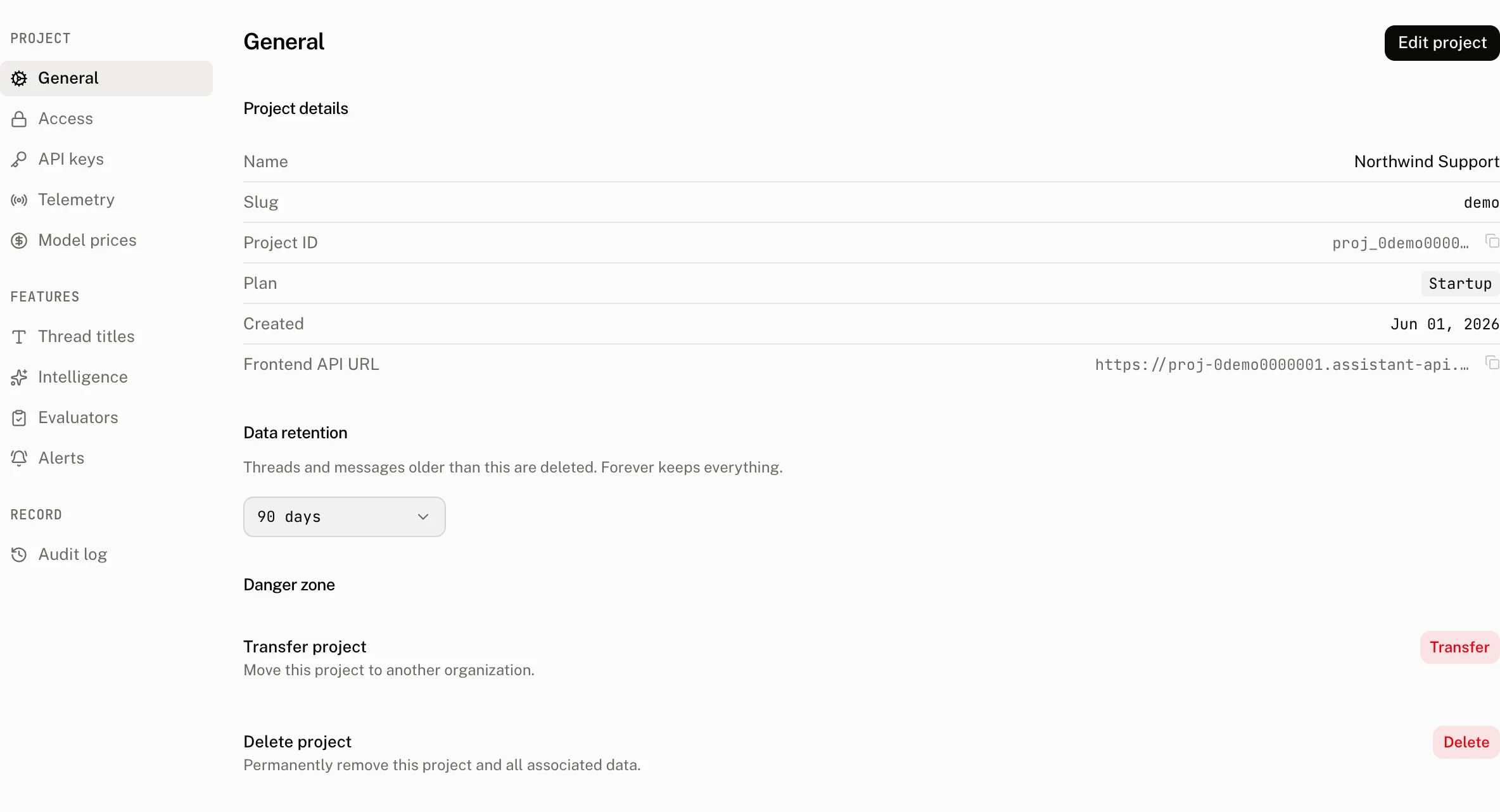
Settings

Every project setting, what it changes, and its limits.

Settings apply per project. Changes are recorded in the audit log with the fields that changed, never with secrets.

General

The project's name and id, and retention: how many days a thread is kept after its last message, from 1 to 3,650, or unlimited. A shorter retention takes effect 24 hours after you set it, and the pending change can be cancelled until then; a longer one applies at once. The hourly retention pass deletes expired threads with their messages and events and blanks the input and output of their runs' spans; the runs themselves and the daily figures the charts read are kept, so usage and cost history survive a short retention.

Access

  • Anonymous sessions. Whether the project issues anonymous identities to browsers that ask. Off by default.
  • Allowed origins. The browser origins the frontend API answers, up to 32; an empty list allows every origin. https:// origins, http://localhost, and *. wildcards that match subdomains. Changes reach the API within a minute. See Authentication.
  • Auth rules. One rule per identity provider: issuer, JWKS endpoint, audience and the claim that names the workspace, sub by default. See Authentication.

API keys

Create keys with a name and an optional expiry of 7, 30, 90 or 365 days; the key is shown once. Each row shows the key's suffix, when it was created, when it was last used, and its expiry. A deleted or expired key is refused at once.

Telemetry

  • Endpoints. The frontend API URL for the browser and the traces endpoint for your server, with copy buttons.
  • Clients. The SDK packages and versions that have sent requests to the project, most recent first. Every request carries an Aui-Sdk header naming assistant-cloud and the integration packages on it, so this is where you see which apps still run an old release. Entries not seen for 180 days drop off.
  • Trace link. A URL template with {trace_id}, for instance https://cloud.langfuse.com/project/abc/traces/{trace_id}. Every run with a trace id links to it.

Model prices

The cloud prices runs from a catalog of provider prices. Add your own rows when you have negotiated rates, run a model the catalog does not know, or route through a reseller: a pattern the model id must match, an optional provider, and the input, cached input and output prices per million tokens. Rows apply to runs written after they are saved, and the page previews which recent models a pattern matches before you save.

LLM providers and assistants

Both live in the dashboard's Build group and are marked alpha.

LLM providers stores a provider's credentials, encrypted, and offers its model list. Providers are used by the features the cloud runs for you: thread titles, intelligence, evaluators and assistants. Without one, thread titles fall back to the cloud's own default model, and the model judged features stay off.

Assistants are runs the cloud executes on your behalf: an assistant names a provider and model, a system prompt, tools, max_steps and timeout_seconds, and is streamed through POST /v1/runs/stream with its id. Such runs are reported with the server side outcomes, timeout, rate_limited, provider_error and server_error, and appear on Runs like any other.

Thread titles

How the cloud names new threads. Titles are generated after a thread's first completed run from its first user and assistant messages:

SettingMeaning
EnabledOff means no titles at all.
Provider and modelOne of your LLM providers, or the cloud's default model.
Languageauto follows the conversation; otherwise a language code such as de or pt-BR.
Maximum words2 to 12, six by default.
InstructionsUp to 1,000 characters added to the prompt, for house style or vocabulary.

The page shows how many threads were titled and what it cost. A title that comes back empty is retried once, and an hourly sweep titles threads the trigger missed within the last seven days. Title runs are the project's own and never count in your figures.

Intelligence

The configuration of the Intelligence feature: provider and model, the junk threshold (messages shorter than this many characters are not classified, 10 by default), test user prefixes whose threads are skipped, the topic ceiling (10 to 60, 30 by default), and instructions for the classifier. Run now queues an analysis of the new threads; Re-analyse reclassifies a number of past days. The analysis runs ledger lists each pass with its counts and cost.

Evaluators

Model judges the intelligence worker applies to new threads. A rule has a name, a description, the prompt, a data type with categories for categorical rules, a sampling rate from 1% to 100%, and the provider and model to judge with. Verdicts are stored as scores with source evaluator. Up to 20 rules per project; a plan feature.

Alerts

A rule watches one metric of the project once an hour and calls a webhook when the threshold is crossed, then stays quiet for its cooldown. Webhook calls are signed with a secret shown when the rule is created.

MetricCompares
daily_runs, daily_cost_usdThe UTC day's runs or cost against the threshold.
daily_error_rate, daily_incomplete_rateThe day's share of failed or incomplete runs.
period_active_usersThe month's active users, for the plan cap.
daily_runs_change, daily_cost_usd_change, daily_incomplete_rate_changeThe day against the mean of the previous seven days, as a percentage rise; silent until three days of history exist.

Cooldown runs from 5 minutes to 7 days, one day by default. The alert events ledger shows each delivery with its status. The number of rules is a plan limit.

Billing and Usage

Billing shows the plan, the active users of the month against the included number and the cap, the pace of the last seven days projected to month end, the day the cap would run out, and what the plan includes. Usage breaks the month down by day, model and user. The plan matrix is on Authentication.

Audit log

Every change made through the dashboard or the API that changes configuration or data: who, what, when, and the fields before and after. Filter by resource type (alert rule, API key, assistant, auth rule, evaluator, feature, intelligence request, model price, project, provider, score, task, user) and by actor. A user erasure through the API is recorded here as well.