Choose how long Assistant Cloud keeps conversation data, schedule shorter windows safely, and understand what remains for reporting.
Retention sets the age at which Assistant Cloud removes conversation data from a project. It is based on a thread's last message time, and the dashboard makes a shorter window a scheduled change so you can see the threads it will affect before deletion begins.
What retention removes
The hourly maintenance pass finds each thread whose last_message_at is older than the project's retention window. For every expired thread, it clears the input and output content of spans belonging to that thread's runs, then removes the thread's client events, messages, and thread row in one transaction. A thread's title is on that thread row, so it is removed with the thread.
The same pass also removes raw client events older than the window and end user display name rows whose last_seen_at is older than the window. Separately, it removes SDK client rows that have not been seen for 180 days.
Retention does not remove every record connected to a conversation.
| Data | Retention result |
|---|---|
| Thread, title, and messages past the window | Deleted. |
| Raw client events past the window | Deleted. |
| Span input and output for a deleted thread | Cleared. |
| Runs, span rows, and scores | Kept. |
| Daily run and client event rollups | Kept. |
| Feature usage ledger | Kept. |
| SDK client row not seen for 180 days | Deleted. |
This boundary preserves historical reporting without retaining conversation content. A deleted thread can therefore still have a run on the Runs page, while its prompt and output have been cleared from that run's spans.
Configure retention
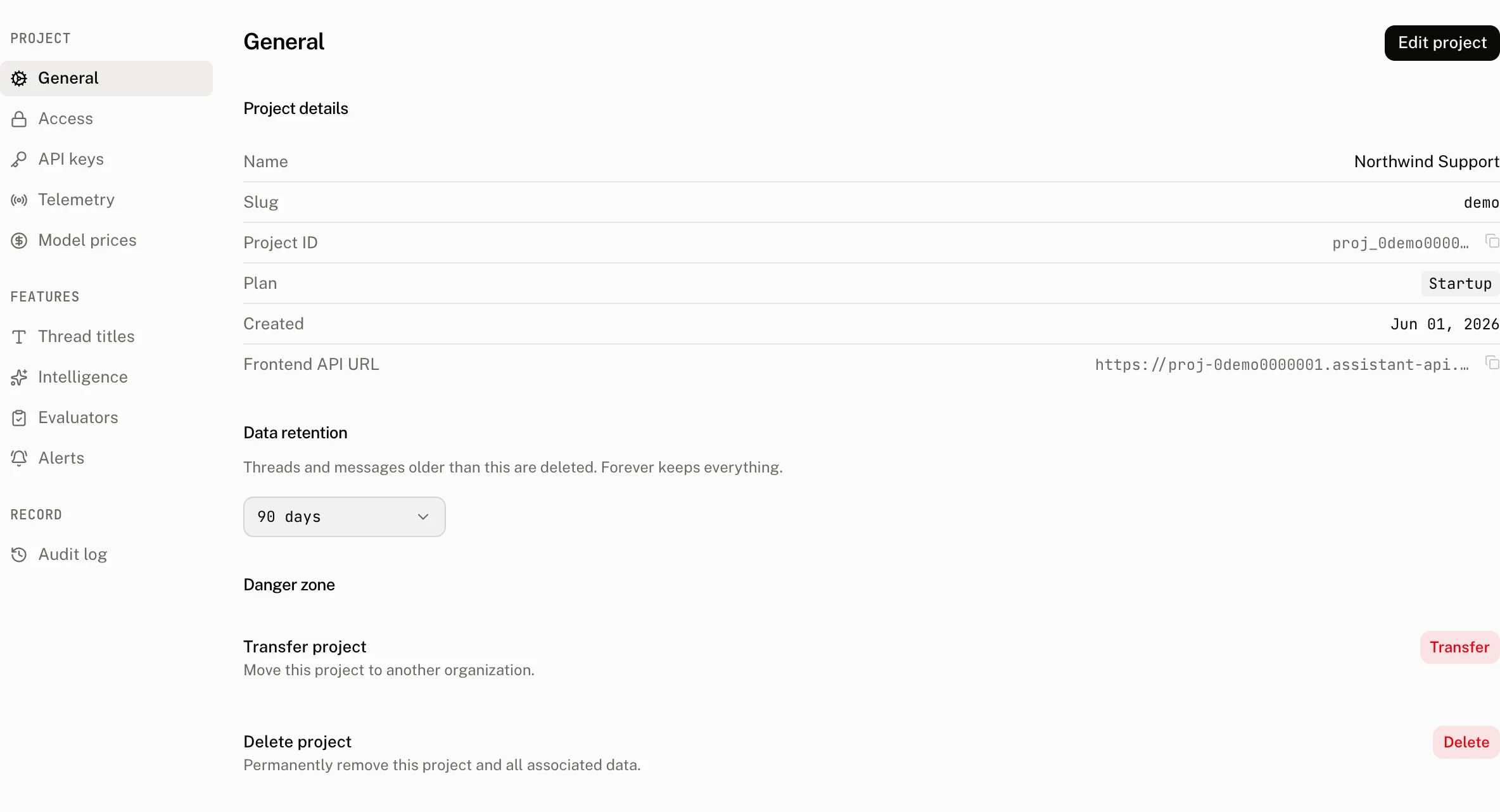
Open Settings › General and choose Data retention. The control says that threads and messages older than the selected value are deleted, while Forever keeps everything.
| Control | Accepts | Effect |
|---|---|---|
| Data retention | Forever, or a number of days from 1 to 3,650. The control offers the presets 7, 14, 30, 60, 90, 180, and 365 days and keeps a stored value outside them. | Selects the project retention window. |
| Schedule deletion | A shorter finite window | Shows the preview and schedules the shorter window. |
| Cancel | A pending shorter window | Removes the pending change before it takes effect. |
Shortening a window
Changing from Forever to a finite window, or choosing fewer days than the current setting, does not apply immediately. The dashboard asks Change data retention?, shows the number of threads that match the new expiration window, and labels the confirmation button Schedule deletion. It stores the requested value as pending for 24 hours while the current window continues to apply.
The pending banner names the requested number of days, the effective date, and how many threads will be deleted. Select Cancel before that time to remove the pending change. Raising the number of days, or changing to Forever, applies immediately and clears any pending change.
The preview counts threads whose last_message_at is earlier than the time of the preview minus the requested number of days. It is an estimate of the upcoming deletion set, not a deletion operation.
Who can change it and what is recorded
Only an organization owner or admin can set or cancel retention. The audit log records project changes. Its retention marks describe a scheduled change as Retention to 30 days, pending and a cancellation as Retention change cancelled; a cancellation is recorded as project.retention.cancel.
What the hourly pass can process
The maintenance pass promotes a pending shorter setting after its effective time, then processes eligible projects with a retention window. It orders expired threads by last_message_at and id, oldest first.
| Batch | Limit per project and hourly pass |
|---|---|
| Expired threads | 200 threads per batch, at most 5 batches, or 1,000 threads |
| Raw client events | 5,000 events |
| End user names | Every matching project_users row the pass finds |
| SDK client rows | Every row not seen for 180 days |
The thread loop stops early when it receives a batch smaller than 200. A project with more than 1,000 expired threads needs more than one hourly pass.
Titles, exports, and plan figures
Retention removes a title together with its thread. The thread export includes title data and, in JSONL, the thread's messages, so export the data you need before the retention window removes those source rows. Exports are available only on plans with the export feature.
The cloud keeps runs, scores, daily rollups, and the feature usage ledger. As a result, historical run, token, cost, and client event rollups remain available after conversation content is removed. Plan and billing views continue to show the project's retention value as Forever or a number of days, and the feature usage ledger continues to provide its retained monthly usage records.
Troubleshooting
| What you see | Why | What to do |
|---|---|---|
| Threads are still present after selecting fewer days | A shorter setting waits 24 hours, and the hourly pass removes no more than 1,000 expired threads from a project in one pass. | Check the pending banner and its effective date. After it takes effect, allow later hourly passes to process any remaining expired threads. |
| A deleted thread is still visible on the Runs page | Retention keeps run rows and span rows, but clears span input and output for deleted threads. | Treat the run as retained reporting history. The conversation data is no longer available from the deleted thread. |
| The preview count differs from a thread list | The preview counts threads against the requested last_message_at cutoff at the time it runs. The list is a separate current view. | Use the preview as the scheduled deletion estimate, then review the pending banner before it takes effect. |
| I cannot save or cancel a retention change | Retention controls require an organization owner or admin. | Ask an owner or admin to make the change. |