Control which browser origins can reach a project's frontend API host through CORS.
Allowed origins controls CORS on your project's frontend API host. It is a browser access rule, not an API key rule: the backend host is unaffected. An empty list allows every origin, which is the default for a new project.
How the browser check works
For a request to the frontend project host, the cloud reads the project's allowed origin list and decides whether to reflect the request's Origin in Access-Control-Allow-Origin. An exact match is allowed. An empty list is also allowed for every origin.
The cloud caches each project's list for 60 seconds. A saved change can therefore take up to 60 seconds to reach a frontend request that uses the cached value.
The CORS response exposes the Authorization header to the browser. This lets an external JWT client read the refreshed internal token that the cloud returns in that header. A refused origin receives no Access-Control-Allow-Origin header, so the browser does not make the response available to the application.
Wildcards match subdomains, not the base domain
https://*.example.com matches https://app.example.com and https://preview.example.com. It does not match https://example.com. A wildcard requires the same protocol and port as the browser origin, and the browser hostname must be a deeper subdomain of the wildcard suffix.
Configure allowed origins
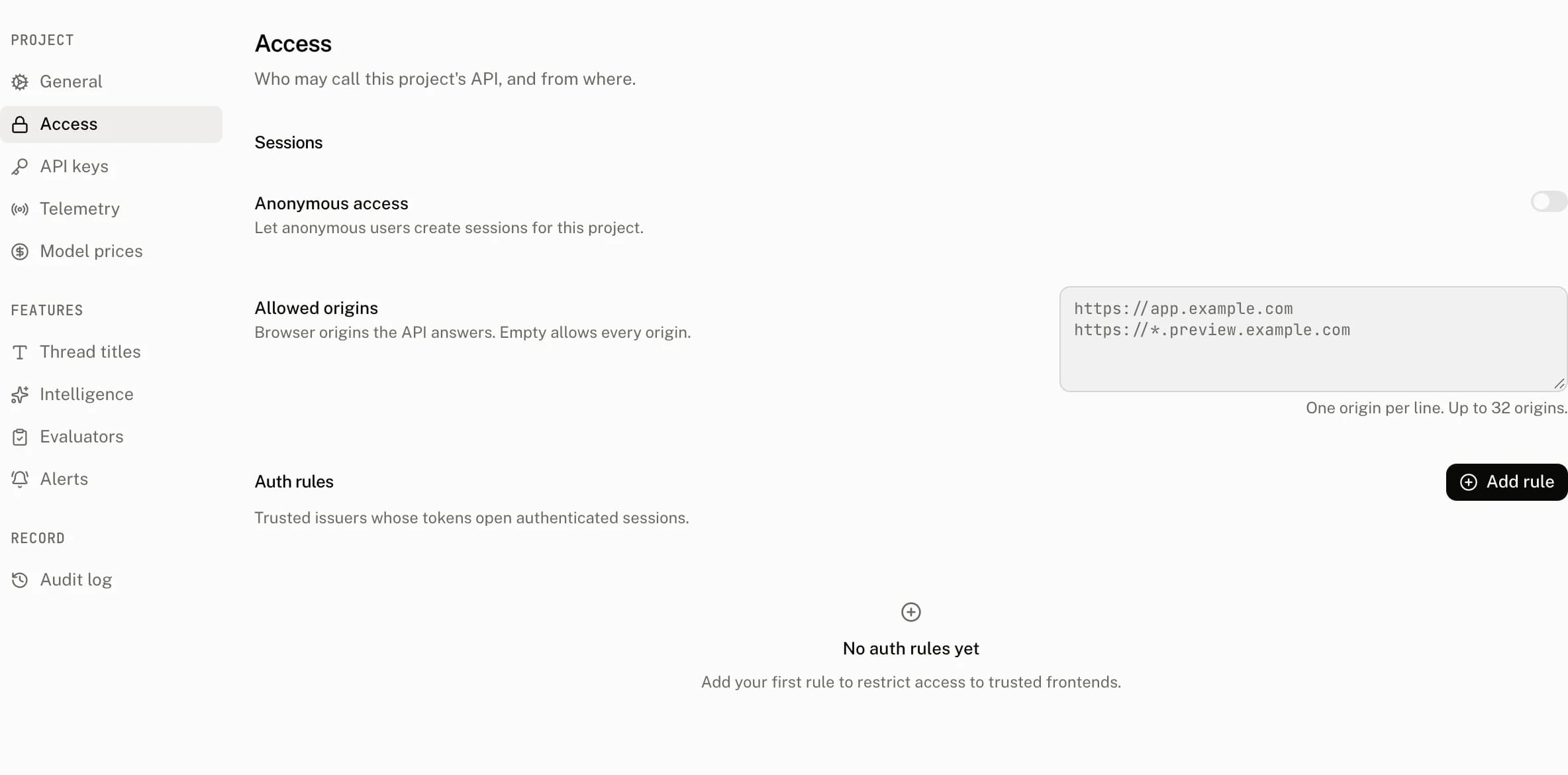
Open Settings › Access. The Allowed origins field accepts one origin per line, and Save appears after you change the value. Only an owner or admin can save this setting.
| Control | Default | Accepts | Effect |
|---|---|---|---|
| Allowed origins | Empty | One normalized browser origin per line, up to 32 entries | Defines which frontend browser origins receive a CORS response. Empty allows every origin. |
Each submitted entry is normalized and deduplicated before it is stored. An invalid entry refuses the save with this message:
Invalid allowed origin: {origin}| Rule | What an entry must satisfy |
|---|---|
| 1 | It is not empty, is no more than 255 characters, and has no leading or trailing whitespace. |
| 2 | It has an http or https scheme and a host, with no path, query, or fragment in its written form. |
| 3 | It parses as a URL with pathname /, no search, no hash, no username, and no password. |
| 4 | A wildcard host begins with *. and has at least two non empty labels after it. No label after *. may itself be *. |
| 5 | Its scheme is https, except http is allowed for a non wildcard localhost, 127.0.0.1, or [::1] origin. |
| 6 | A hostname contains no * except the leading wildcard described above. |
| 7 | It is stored as its URL origin. The port stays, and a trailing slash is removed. |
A list of more than 32 entries is refused with:
At most 32 allowed origins are permittedSaving creates an audit entry, which you can review in Settings › Audit log.
Recipes
Preview deployments
Allow every preview subdomain with one https wildcard entry:
https://*.preview.example.comThis permits https://pr-42.preview.example.com, but not https://preview.example.com. It also does not permit a preview on another port.
Local development
Allow a local browser with a non wildcard loopback origin:
http://localhost:3000http is permitted only for localhost, 127.0.0.1, and [::1] without a wildcard. A public origin must use https.
A port is part of the origin
Ports must match exactly. https://app.example.com:3000 does not allow https://app.example.com:3001, and https://*.example.com:3000 only matches subdomains on port 3000.
What a refused browser request sees
The frontend host still receives the request, but a nonmatching origin does not get Access-Control-Allow-Origin. Browser CORS then prevents your application from reading the response.
Costs and limits
| Limit or behavior | Value |
|---|---|
| Allowed origins | 32 entries |
| Origin length | 255 characters |
| Origin list cache | 60 seconds per project |
| Empty list | Allows every origin |
| Wildcard scope | Same protocol and port, strictly deeper subdomain only |
Troubleshooting
| What you see | Why | What to do |
|---|---|---|
| The browser blocks a frontend request after you restricted the list | The request origin has no exact or matching wildcard entry, so the response omits Access-Control-Allow-Origin. | Add the browser's full origin, or a matching wildcard, then wait up to 60 seconds for the cache. |
| A wildcard does not allow the base domain | *.example.com matches only deeper subdomains. | Add https://example.com as a separate exact entry when the base domain needs access. |
| A preview domain is still refused | Its protocol or port differs from the wildcard entry, or it is not a subdomain of the wildcard suffix. | Match the preview host's protocol and port exactly. |
Saving http://app.example.com fails | Public origins must use https. | Use https://app.example.com; reserve http for the supported loopback hosts. |
| Saving an origin with a path fails | An allowed origin contains only scheme, host, and an optional port. | Remove the path, query, fragment, and any credentials. |
| Saving changes nothing for a member | Allowed origins is an owner and admin setting. | Ask an owner or admin to save the list. |
| A server key request is not fixed by adding an origin | Allowed origins controls CORS only on the frontend host. | Use the backend host and the required API key headers for server requests. |