Trust external JWT issuers with auth rules, exchange their tokens in the browser, and mint cloud tokens from a server when needed.
An auth rule tells Assistant Cloud which external JWT issuer may open a signed in browser session. Create rules in Settings › Access, where the page lists each rule's name, issuer, audience, JWKS URL, creation time, and actions. A rule does not copy users from your provider. It verifies the token presented by your app, then records a display name when you choose a Name claim.
How a rule accepts a token
A browser first sends the JWT returned by authToken. The cloud derives the project from the request host, requires an RS256 token with an iss claim and a kid header, then finds an auth rule in that project. A rule matches only when its issuer equals the token issuer and either its audience is null or its audience appears in the token's aud list.
token.issuer equals rule.issuer
and (rule.audience is empty or token.audience contains rule.audience)
and token.algorithm is RS256
and token.header has kid
The cloud revalidates the rule's JWKS endpoint as a public HTTPS URL before it fetches the selected key. The fetch times out after one second. Its remote JWKS resolver cache is bounded to 10,000 URLs. It then verifies the signature and claims. sub becomes the user id, and the rule's workspace claim becomes the workspace id. The dashboard currently fixes that claim to User ID, so it remains unset on the rule and the cloud uses sub.
The Name claim is optional. When it is set, the cloud reads that JWT claim, trims it, limits it to 255 characters, and records it as the user's display name. It writes a given project, user, and name combination at most once every five minutes. If you remove a Name claim or delete a rule that had one, stored names are forgotten only after no rule in the project names a claim. Those names appear in the dashboard's user and thread lists; otherwise the dashboard shows the user id.
Configure an auth rule
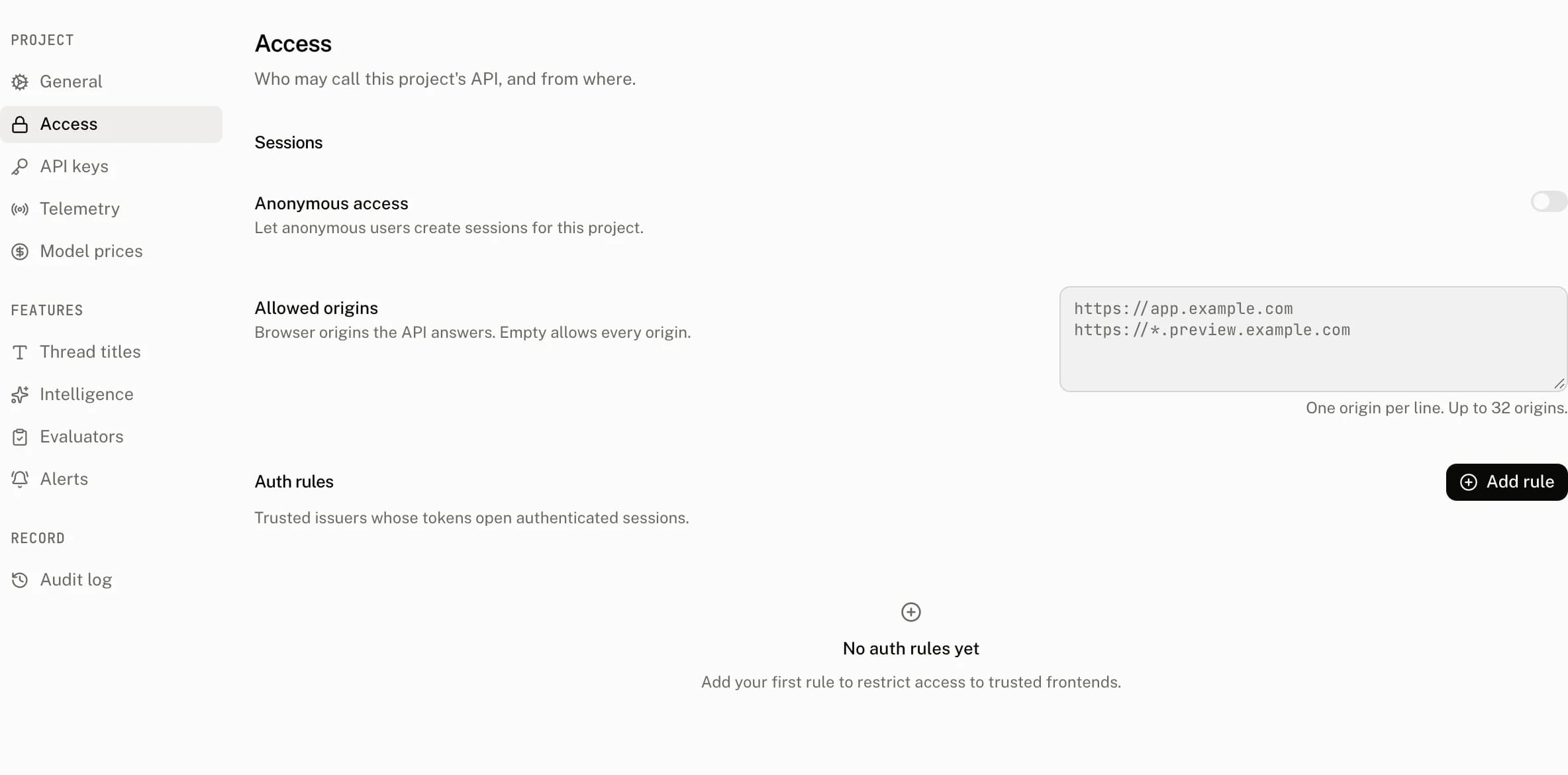
Choose Add rule in Settings › Access, then save the rule. A signed in member can create, edit, or delete auth rules. The rule form has these controls:
| Control | Default | Accepts | Effect |
|---|---|---|---|
| Provider | No selection | Auth0, Clerk, Firebase, Supabase, or Custom | Required. An empty selection reads Select a provider; the choice labels the rule and opens provider documentation for the first four choices. |
| Name | Empty | 1 to 255 characters | The rule name shown in the table. An empty name reads Name is required. |
| Issuer | Empty | An optional 1 to 2,047 character value | Must equal the presented token's iss to match. |
| Audience | Empty | An optional 1 to 2,047 character value | Must appear in the token's aud. Leave it empty to match a token regardless of audience. |
| JWKS endpoint | Empty | A required public HTTPS URL, 1 to 2,047 characters | Supplies the public keys used to verify a matching token. An empty value reads JWKS endpoint is required; invalid, private, or non HTTPS endpoints are refused. |
| Workspace ID claim | User ID | Fixed, disabled control | The form does not submit a claim name. The cloud uses sub as the workspace id. |
| Name claim | Empty | An optional 1 to 255 character claim name | Names the JWT claim to record as the display name. Whitespace is trimmed and an empty value is saved as no claim. |
There is no per project auth rule count limit. Several rules are useful when separate frontends or identity providers need access to the same project. Each presented token is still accepted only by a rule that matches its issuer and audience.
Exchange provider tokens in the browser
After the cloud accepts a provider JWT, its response includes Authorization: Bearer <internal token>. The internal token is valid for five minutes, has an nbf ten seconds before its issue time, and carries the project, user, and workspace. The SDK keeps it until 30 seconds before expiry and shares one pending call to authToken across concurrent requests.
A callback returning null means signed out; the SDK throws Authorization failed before it sends that request.
Keep the AssistantCloud client in useMemo. Recreating it on a render discards the exchanged token cache and can call the provider more often than needed. When the client backs a runtime, recreate it when the signed-in user or workspace changes so the runtime also drops the previous session's loaded threads and messages. For a client used outside a runtime, call cloud.auth.invalidate() before the next request instead. Invalidation clears the cached credential and pending engagement events; the next request calls authToken for the new session.
From your code
The provider token callback returns the JWT you configured the rule to verify. These provider examples use the same browser client shape.
Create a Clerk JWT template named assistant-ui with { "aud": "assistant-ui" }. Set the rule's issuer, JWKS endpoint, and audience to the template values. getToken keeps its identity when the user or organization changes, so key the client to Clerk's userId and orgId; userId is undefined while Clerk loads and null once the user is signed out. Render the runtime once isLoaded is true so its first client already has the final identity.
"use client";

import { useMemo } from "react";
import { useAuth } from "@clerk/nextjs";
import { AssistantCloud } from "@assistant-ui/react";

function useCloud() {
  const { getToken, userId, orgId } = useAuth();
  const scope = userId === null ? null : `${userId ?? ""}:${orgId ?? ""}`;
  return useMemo(
    () => new AssistantCloud({
      baseUrl: process.env.NEXT_PUBLIC_ASSISTANT_BASE_URL!,
      authToken: async () =>
        scope === null ? null : getToken({ template: "assistant-ui" }),
    }),
    [getToken, scope],
  );
}
Set the rule issuer to your Auth0 domain, its JWKS endpoint to /.well-known/jwks.json, and the audience to your API audience. getAccessTokenSilently keeps its identity across users, so key the client to the signed-in user's sub, and treat the user as signed out only after Auth0 finishes loading. Render the runtime once isLoading is false so its first client already has the final identity.
"use client";

import { useMemo } from "react";
import { useAuth0 } from "@auth0/auth0-react";
import { AssistantCloud } from "@assistant-ui/react";

function useCloud() {
  const { getAccessTokenSilently, isAuthenticated, isLoading, user } =
    useAuth0();
  const scope = !isLoading && !isAuthenticated ? null : (user?.sub ?? "");
  return useMemo(
    () => new AssistantCloud({
      baseUrl: process.env.NEXT_PUBLIC_ASSISTANT_BASE_URL!,
      authToken: async () => (scope === null ? null : getAccessTokenSilently()),
    }),
    [getAccessTokenSilently, scope],
  );
}
A JWKS rule requires an RS256 signing key. Return the Supabase session access token after configuring its issuer and JWKS endpoint in the rule. Each client binds to the first user its token callback sees, and a later sign-in as a different user creates a new client, so an old runtime never sends the new user's token.
"use client";

import { useEffect, useMemo, useState } from "react";
import { AssistantCloud } from "@assistant-ui/react";
import { supabase } from "./supabase";

function useCloud() {
  const [userId, setUserId] = useState<string | null>();

  useEffect(() => {
    let current: string | null | undefined;
    const { data } = supabase.auth.onAuthStateChange((_event, session) => {
      const next = session?.user.id ?? null;
      if (current !== undefined && next !== current) setUserId(next);
      current = next;
    });
    return () => data.subscription.unsubscribe();
  }, []);

  return useMemo(() => {
    let boundUserId = userId;
    return new AssistantCloud({
      baseUrl: process.env.NEXT_PUBLIC_ASSISTANT_BASE_URL!,
      authToken: async () => {
        const { data } = await supabase.auth.getSession();
        const session = data.session;
        if (!session) return null;
        if (boundUserId === undefined) boundUserId = session.user.id;
        return session.user.id === boundUserId ? session.access_token : null;
      },
    });
  }, [userId]);
}
Firebase ID tokens use RS256 and publish keys. Configure the project's issuer and JWKS endpoint, then return the current user's ID token once Firebase has restored the session. Clients bind to one user the same way as in the Supabase example.
"use client";

import { useEffect, useMemo, useState } from "react";
import { AssistantCloud } from "@assistant-ui/react";
import { onAuthStateChanged } from "firebase/auth";
import { auth } from "./firebase";

function useCloud() {
  const [userId, setUserId] = useState<string | null>();

  useEffect(() => {
    let current: string | null | undefined;
    return onAuthStateChanged(auth, (user) => {
      const next = user?.uid ?? null;
      if (current !== undefined && next !== current) setUserId(next);
      current = next;
    });
  }, []);

  return useMemo(() => {
    let boundUserId = userId;
    return new AssistantCloud({
      baseUrl: process.env.NEXT_PUBLIC_ASSISTANT_BASE_URL!,
      authToken: async () => {
        await auth.authStateReady();
        const user = auth.currentUser;
        if (!user) return null;
        if (boundUserId === undefined) boundUserId = user.uid;
        return user.uid === boundUserId ? user.getIdToken() : null;
      },
    });
  }, [userId]);
}
Use this choice when your provider cannot supply an RS256 JWT with a public JWKS endpoint. Have your authenticated server mint a cloud token instead.
Mint a token on your server
POST /v1/auth/tokens creates a cloud token for the API key client's Aui-User-Id and Aui-Workspace-Id. It accepts no body, requires an API key on the backend host, and returns { "token": "..." }. The minted token carries sub, workspace_id, project_id, and the project frontend issuer. It is valid for five minutes and is accepted ten seconds before issue time.
POST /v1/auth/tokens
Authorization: Bearer sk_aui_proj_abcdef123456_secret
Aui-User-Id: usr_123
Aui-Workspace-Id: org_123_usr_123import { AssistantCloud } from "assistant-cloud";
import { auth } from "@clerk/nextjs/server";
export const POST = async () => {
const { userId, orgId } = await auth();
if (!userId) return new Response("Unauthorized", { status: 401 });
const cloud = new AssistantCloud({
apiKey: process.env.ASSISTANT_API_KEY!,
userId,
workspaceId: orgId ? `${orgId}_${userId}` : userId,
});
const { token } = await cloud.auth.tokens.create();
return new Response(token);
};const cloud = new AssistantCloud({
baseUrl: process.env.NEXT_PUBLIC_ASSISTANT_BASE_URL!,
authToken: async () => {
const response = await fetch("/api/assistant-ui-token", { method: "POST" });
return response.ok ? response.text() : null;
},
});Provider token errors
| Status | Error string | Cause |
|---|---|---|
| 401 | JWT token has expired | The provider token's exp is past. |
| 401 | JWT token is not yet valid | Its nbf is in the future. |
| 403 | Invalid JWT token | The token cannot be decoded. |
| 403 | JWT token algorithm is not valid | It is not RS256. |
| 403 | JWT payload is missing iss | It has no issuer. |
| 403 | JWT header is missing kid | It cannot select a JWKS key. |
| 403 | Invalid project ID | The request host cannot identify a project. |
| 403 | No auth rule matches the JWT iss and aud claims | No rule matches its issuer and audience. |
| 403 | JWT payload is missing sub | It has no user id. |
| 403 | JWT sub is not a valid user ID: … | sub is not a valid user id. |
| 403 | JWT <claim> is not a valid workspace ID: … | The workspace claim is not valid. |
| 403 | JWT token is not valid | Signature or another claim check failed. |
| 403 | Origin does not match project ID | A valid token was sent to the wrong host. |
The token minting endpoint additionally answers 403 "This endpoint may only be accessed from the backend" to a non API key credential. Other header and API key failures are listed on Authentication.
Troubleshooting
| What you see | Why | What to do |
|---|---|---|
No auth rule matches the JWT iss and aud claims | The issuer differs, or the rule audience is not in the token's audience list. | Copy the JWT's iss exactly and set the rule audience to a value the token carries, or leave the rule audience empty. |
JWT token algorithm is not valid | The provider token is not RS256. | Use a provider JWT with an RS256 signature, or mint a cloud token from your server. |
JWT header is missing kid | The token cannot select a public key from the JWKS document. | Return a provider token with a kid header. |
The browser reports Authorization failed | authToken returned null or an empty token. | Wait until the provider has a signed in session, then return its token. |
| The dashboard shows an id instead of a name | No remaining rule names a Name claim, or that claim was empty. | Set a Name claim that resolves to a nonempty value in the provider JWT. |
| A valid token is refused on one frontend but not another | The request reached a host other than the project frontend host. | Use the project's frontend baseUrl; do not send browser credentials to the backend host. |