Connect the model accounts that Assistant Cloud features use for generation, analysis, and evaluation.
An LLM provider is a named connection to a model account. It holds the credentials and the Models list that Assistant Cloud needs when a feature calls a model, while keeping the credential values out of the dashboard.
A provider can supply a model for thread titles, Intelligence, Evaluators, Assistants, or a harness voice configuration. Each feature records the provider and model it uses, so its runs can be attributed to that model account.
How providers are used
| Feature | How it uses a provider |
|---|---|
| Thread titles | Uses the selected provider and model to name conversations. When no title model is saved, the first model on the provider's list is used. |
| Intelligence | Uses the provider and model chosen in Settings › Intelligence to classify conversations. |
| Evaluators | A rule can name a provider and model for its verdicts. |
| Assistants | Each assistant is bound to a provider and its model configuration. |
| Harness voice | A harness can hold a voice provider reference. |
Provider list and pages
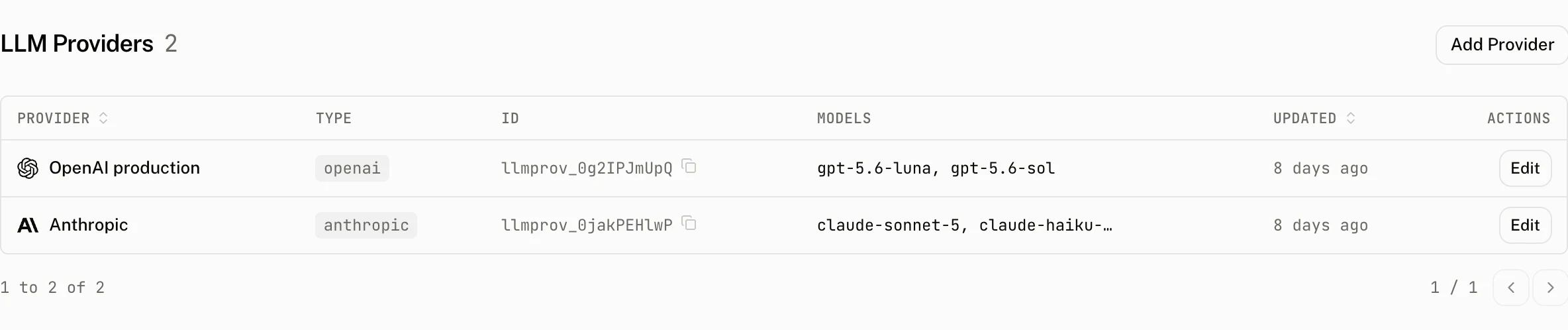
The LLM Providers list shows Provider, Type, ID, Models, Updated and Actions. A provider page shows its copyable ID and type, the configured Models list, and Details for Type, Provider key, Base URL, Models and Credential fields. Its Edit action opens the configuration page, which lets you save or cancel changes.
Configure a provider
Choose a preset when it matches your model account. The form renders one credential input for each field in that preset. Fields whose names contain KEY, TOKEN, or SECRET are password inputs.
| Preset | Stored type | Credential fields | Base URL rule |
|---|---|---|---|
| OpenAI | openai | OPENAI_API_KEY | No base URL field. |
| Anthropic | anthropic | ANTHROPIC_API_KEY | No base URL field. |
| Google AI | google | GOOGLE_GENERATIVE_AI_API_KEY | No base URL field. |
| xAI | xai | XAI_API_KEY | No base URL field. |
| Mistral AI | mistral | MISTRAL_API_KEY | No base URL field. |
| Groq | groq | GROQ_API_KEY | No base URL field. |
| Azure AI Foundry | azure | AZURE_RESOURCE_NAME, AZURE_API_KEY | The deployment host is derived from the resource name. |
| Amazon Bedrock | amazon-bedrock | AWS_ACCESS_KEY_ID, AWS_SECRET_ACCESS_KEY, AWS_REGION | No base URL field. |
| DeepSeek, Hugging Face, Fireworks AI, Together AI, OpenRouter, NVIDIA, Perplexity, Cerebras, SiliconFlow, Ollama Cloud, Cloudflare AI Gateway, or Cloudflare Workers AI | openai-compatible | The preset's fields, such as DEEPSEEK_API_KEY, OPENROUTER_API_KEY, or the Cloudflare token, account, and gateway fields. | Uses that preset's URL template. A template that reads credentials hides the URL input and derives the URL from those values. |
| Custom OpenAI Compatible | openai-compatible | Optional API_KEY | A base URL is required. |
Form rules
| Rule | Effect |
|---|---|
| Name | Required, from 1 to 255 characters. The form shows Name is required when it is empty. A project cannot have two providers with the same name. |
| Base URL | It must be a valid public HTTPS URL. OpenAI compatible providers require one and the form shows Base URL is required for OpenAI Compatible providers when it is missing. |
| Primary secret on create | A provider type that declares a primary secret requires that field when you create it. The custom OpenAI compatible form keeps API_KEY optional. |
| Credentials on update | Leave a credential empty to keep its current value. The dashboard does not return stored credential values. |
| Type, base URL or endpoint changes | A change of type or base URL, or a new value for a credential the endpoint is built from (AZURE_RESOURCE_NAME, AWS_REGION, or a ${VAR} named in the base URL), needs the provider's secrets in the same save and replaces the stored credential map. Otherwise the save is refused with Changing provider type, base URL, or endpoint credentials requires new credentials in the same request. Other credential updates merge with what is stored. |
| Azure resource name and AWS region | AZURE_RESOURCE_NAME and AWS_REGION become part of the host a key is sent to, so each must be a single hostname label: letters, digits and hyphens, up to 63 characters. Any other value is refused with AZURE_RESOURCE_NAME is not a valid Azure resource name or AWS_REGION is not a valid AWS region, on create, on update and when the form loads models. |
| Models | Every provider type has a Models list, and its first entry is the default: the model used wherever the provider is chosen without a model, on Thread titles and Intelligence. Opening the field or pressing Load models asks the provider for its models with the credentials in the form; a saved provider is asked with its stored credentials when none are entered and its type and base URL are unchanged. Pick from that list or type any id the provider serves, then Enter. |
The URL check rejects private hosts. It applies when the provider is created and when its base URL changes, before the cloud stores the connection.
How model discovery works
Four model fields are a free text id with the provider's own list as suggestions: the Models list on the provider form, the Model row on Settings › Thread titles and Settings › Intelligence, and the Model field of an assistant. An evaluator's Model ID field takes any id too, but suggests only the ids on its provider's Models list. The dashboard asks the provider for its models over a public HTTPS URL with the provider's credentials and gives up after ten seconds. A saved provider's answer is kept in server memory, keyed by the provider and its last update, so an edited provider is asked again: a list is reused for up to an hour, a failure for at most a minute. A provider that is not saved yet is asked with the credentials entered in its form.
| Provider type | Model listing request |
|---|---|
| OpenAI | {base URL or https://api.openai.com/v1}/models with bearer authentication. |
| Anthropic | /models?limit=1000 with anthropic-version: 2023-06-01 and x-api-key. |
| Google AI | /models?pageSize=1000 with x-goog-api-key. Only models that support generateContent remain, and the models/ prefix is removed. |
| xAI, Mistral AI, Groq | Each provider's /models endpoint. |
| Azure AI Foundry | https://{AZURE_RESOURCE_NAME}.openai.azure.com/openai/deployments?api-version=2023-03-15-preview with api-key. Azure lists deployments rather than models. |
| Amazon Bedrock | https://bedrock.{AWS_REGION}.amazonaws.com/foundation-models, signed with AWS credentials. The list keeps only models with TEXT output and ON_DEMAND inference. When no region is supplied, it uses us-east-1. |
| OpenAI compatible | {base URL or preset URL}/models. |
When the provider does not answer, the field says why and the catalog's models for the provider key stand in, so the response reports source: "provider" or source: "catalog" and, for a catalog answer, the reason:
| Reason | What it means |
|---|---|
no_list | There is no address to ask: an OpenAI compatible provider whose form has neither a base URL yet nor a preset URL. |
credentials | There is no key to ask with. The stored credentials cannot be read, or the form changed the type or base URL without entering credentials. |
blocked | The address is not a public HTTPS URL, or the Azure resource name or AWS region is not a hostname label. |
timeout | No answer within ten seconds. |
unreachable | The request failed before an answer arrived. |
rejected | The provider answered 401 or 403; it refused the key. |
failed | The provider answered another HTTP error. |
empty | The provider answered with no model, or with a body that is not JSON. |
How the list is ranked
The ids are grouped by what the shared model catalog, the one that also prices runs, knows about each. Pinned on this provider holds the provider's own Models list, ahead of everything else. Suggested holds the listed models whose output is text alone and that can do what the feature needs: tool_call for thread titles and assistants, structured_output for Intelligence, judged by tool calling when the catalog does not say. Other models holds the ids the catalog does not know, since a provider serves ids no catalog lists, and the deprecated models that qualify; a catalog model that cannot do the job is left out. A dated snapshot such as gpt-4o-2024-08-06 is left out when its alias gpt-4o is listed too. Within a group, model families sort alphabetically with the newest version first. An id that matches nothing in the list is used as typed.
Credential storage and audit history
Credential values are encrypted with AES-256-GCM. Each value has a new 12 byte random IV and is stored as enc:<iv_hex>:<ciphertext_hex>; credential names remain in clear text so the cloud can render the needed inputs.
Provider creation, updates, and deletion enter the audit log as provider.create, provider.update, and provider.delete. The audit record includes the name, type, provider key, model list, and credential map. Audit redaction removes credential key names that match api_key, credentials, secret, sha256, or suffix, and a configured base URL is recorded as [redacted].
Costs and limits
The provider key is the catalog identity that the cloud uses for model discovery and pricing. The chosen preset supplies it when the provider is created. The models pinned on a provider are offered whether or not the provider answers.
You cannot delete a provider while an assistant still uses it. The dashboard refuses the delete with This provider is currently in use by one or more assistants. Please update or delete the assistants using this provider first.
Troubleshooting
| What you see | Why | What to do |
|---|---|---|
| The model field offers no list | The provider did not answer, the catalog has no models for the provider key and the provider's Models list is empty. The note under the list says why: The provider refused the key (HTTP 401), The provider took too long to list its models, and so on. | Fix what the note names and load the models again, or type the id: any id the provider serves is accepted. |
Choose a model for this provider when saving Thread titles or Intelligence | The feature is on, the Model field is empty and the chosen provider's Models list is empty, so there is no default to fall back to. | Type or pick a model, or add one to the provider's Models list. |
AZURE_RESOURCE_NAME is not a valid Azure resource name or AWS_REGION is not a valid AWS region | The value would become part of the host the key is sent to and is not a single hostname label. | Enter the resource name alone, my-resource rather than my-resource.openai.azure.com, or the region alone, such as us-east-1. |
| A private URL is refused | Provider URLs must be public HTTPS URLs. | Use a public HTTPS endpoint for the provider. |
| Thread title runs report provider errors | The title feature uses the provider credentials and selected model for its model call. | Verify the provider credentials, the model list, and the model account's access to that model. |