How Assistant Cloud stores conversation trees, converts message formats, persists runtime history and records message feedback.
Messages are the durable transcript inside a cloud thread. The cloud keeps them as a tree rather than one flat sequence, so an edit or regeneration can retain the earlier path. For the complete request and response contract, see the Messages API reference.
How messages form a tree
Every stored message has a parent_id. The field must be present when a message is created, and is null for a root. A child points to another message in the same thread. The database computes height when it inserts the row, so clients supply the parent, not a height.
An update replaces the content of one existing message in place. The message keeps its parent and its children, so a runtime can store what arrives after the message was written, such as a late tool result, an approval answer or feedback, even when later turns follow it. An edit or regeneration creates another path from the appropriate parent instead. That branch keeps the original messages intact and lets the app choose which branch to show. Message pages list the tree in height, created_at, then id order, all descending, so a page returns the newest rows at each height first.
Stored formats and read conversion
The local runtime writes aui/v0. The AI SDK runtime writes ai-sdk/v6, and a thread can also contain ai-sdk/v5 from older clients. The creation route accepts a format string, but these are the formats the cloud recognizes for conversion.
| Stored row | No format query | format=ai-sdk/v5 | format=ai-sdk/v6 |
|---|---|---|---|
aui/v0 | Returned as aui/v0 | Converted to ai-sdk/v5, with data parts as data-<name> and document sources as source-document | Converted to ai-sdk/v6, with data parts as data-<name> and document sources as source-document |
ai-sdk/v5 | Returned as ai-sdk/v5 | Returned as ai-sdk/v5 | Converted to ai-sdk/v6 |
ai-sdk/v6 | Returned as ai-sdk/v6 | Returned as stored | Returned as ai-sdk/v6 |
Every other source and requested format combination is returned as stored. If the cloud cannot parse or convert one row, it warns and skips that row instead of failing the whole page. When attachment storage is configured, attachment URLs in a listed message are replaced with signed read URLs that expire after 15 minutes.
Configure persistence
Choose the runtime that owns the conversation history before a thread is used. The runtime determines the format it writes and the history adapter it reads. The cloud stores the row and its parent relationship, while the adapter converts it back to the runtime's message shape.
| Runtime path | Stored format | How it persists |
|---|---|---|
| Local runtime | aui/v0 | Initializes the remote thread, encodes a message and appends it with its parent id. |
| AI SDK runtime | ai-sdk/v6 | Pins the current thread list item, then encodes and writes settled messages through the formatted history adapter. |
| External-store runtime | aui/v0 | Copies eligible backend messages with external_id values. |
| Older AI SDK client | ai-sdk/v5 | Its rows remain readable directly or through the ai-sdk/v6 conversion path. |
The AI SDK adapter pins the thread list item before it writes, so a later thread switch does not redirect an in flight history write. It waits for the run to settle, appends each unpersisted message once with its chained parent, and updates an already persisted message only when the encoded content changed. The cloud history adapter never deletes a message.
When a local runtime write through a cloud history adapter fails, thread.historyWriteError carries its operation, messageIds, threadId, and a readable message. Listeners receive the event while bound to the affected thread, so a write that fails after you switch away reaches no listener; the runtime logs every failed write with console.error either way. The cloud's stored tree may no longer match the thread. A write returned to its caller still rejects.
An external-store runtime never copies a message without a backend ID. It skips fallback IDs beginning __external_store_fallback_, optimistic messages, error IDs, and running assistant messages. Empty IDs and IDs longer than 255 characters are also skipped.
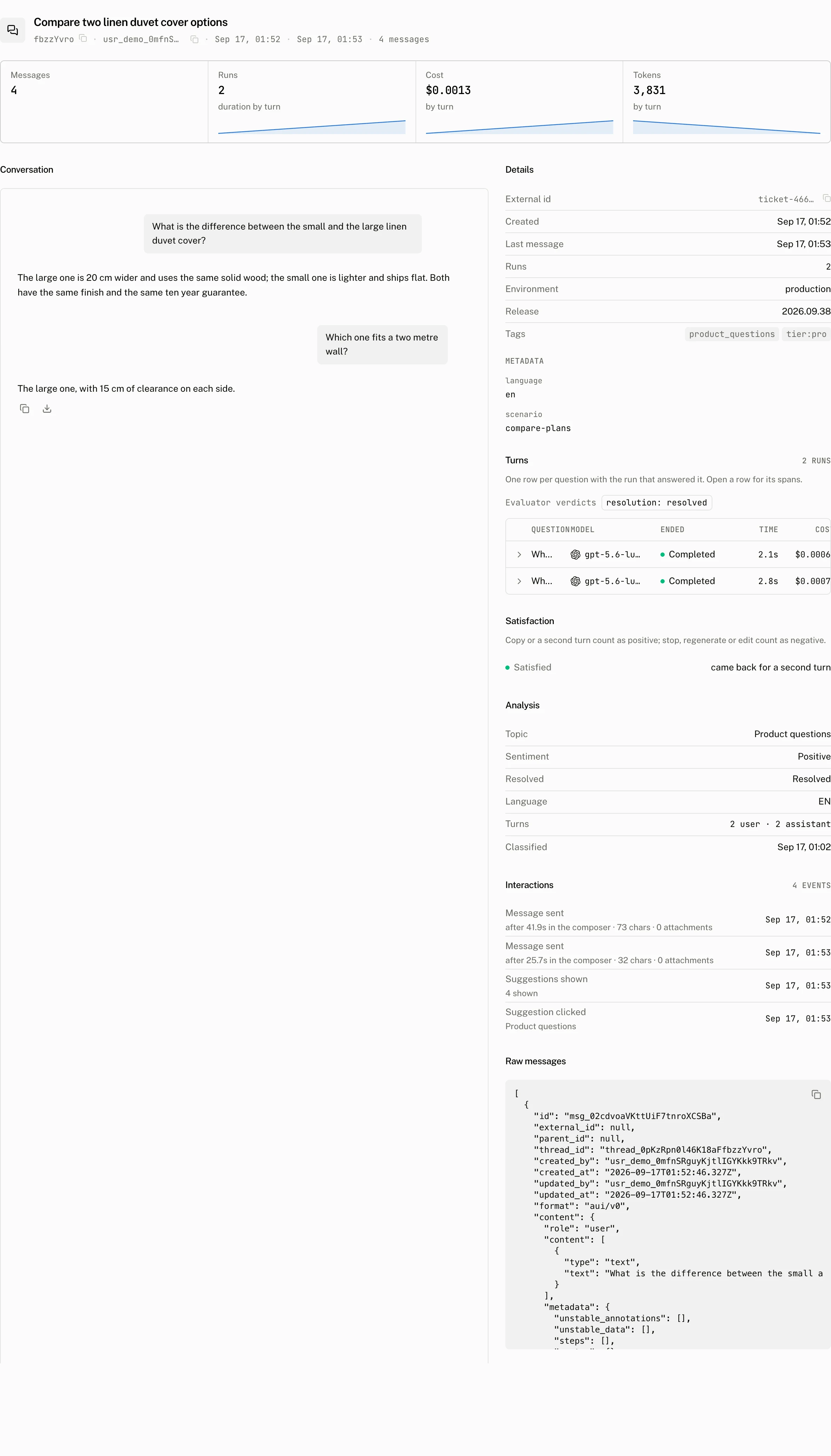
What the thread view shows
The thread detail view renders the conversation and a Raw tab from the same stored tree. Its Turns tab joins each question to the run that answered it, while the Activity tab records end user events such as edits and regenerations. The page can show up to 200 messages, ordered by height and creation time, alongside the thread's run and satisfaction data.
From your code
The client exposes list, create, update and feedback calls under cloud.threads.messages. A new root message sends parent_id: null; a child sends the remote id of its parent.
const { message_id } = await cloud.threads.messages.create(threadId, {
  parent_id: null,
  format: "aui/v0",
  content: {
    role: "user",
    content: [{ type: "text", text: "Can I change my delivery address?" }],
  },
});

await cloud.threads.messages.update(threadId, message_id, {
  content: {
    role: "user",
    content: [{ type: "text", text: "Can I change the delivery address for order 1042?" }],
  },
});
Use cloud.threads.messages.create when an application mirrors its own message IDs. It accepts external_id to make a repeat safe and parent_external_id to let a mirrored child refer to the application's parent ID.
| Repeat or parent case | Result |
|---|---|
Same external_id, identical content and format | Answers 200 with the existing message_id, without a write. |
Same external_id, changed content | Updates content and format, answers 200, and advances the thread's last_message_at. |
Same external_id, changed content.role | Answers 409 with Message role cannot change. |
| Both parent fields supplied | parent_external_id wins over parent_id. |
| Parent id does not name a message in this thread | Answers 400 with Parent message not found in thread. |
| Parent external id does not name a message in this thread | Answers 400 with Parent message with external_id not found in thread. |
A delete request accepts from 1 to 200 message ids. It is best effort: a mixed batch answers 200 when at least one id belonged to the thread, and answers 404 Messages not found when none did.
What storing a message triggers
The first new user message from an end user in the usage period records that user as active for the project. A user already counted in the period can continue storing messages. A new user beyond the plan's active user cap receives 402 with error: "plan_limit_reached", the project's plan, an ISO period_end, and the numeric cap that was reached.
A newly created user message on a thread without a title queues a thread title, written from the stored messages. Read Thread titles for the title rules.
Send feedback for a message
cloud.threads.messages.feedback(threadId, messageId, { type }) submits positive or negative feedback for one message. The cloud stores it as that end user's boolean feedback score. Submitting feedback again changes the existing score rather than adding another one. The Scores page explains the score record and the dashboard views that read it.
Costs and limits
The cloud limits the stored content and the page and deletion batches below. The active user check runs only when a new user message is inserted, after the external_id idempotency check, so an identical mirrored repeat does not consume active user capacity.
| Limit | Value |
|---|---|
Serialized content | At most 1,048,576 characters after JSON.stringify(content) |
| List page | 1 to 200 messages, 200 by default |
| Delete request | 1 to 200 message ids |
| Attachment read URL | Signed for 15 minutes |
CloudMessagePersistence loads 200 messages at a time with an after message id cursor. It stops after a short page or after a page that contains only rows it already saw, which prevents a bad cursor from replaying history forever. It puts loaded remote ids into its local id map, while a pending append keeps its promise in that map until the remote id resolves.
Troubleshooting
| What you see | Why | What to do |
|---|---|---|
| History is empty after switching runtimes | The local runtime reads aui/v0, while the AI SDK runtime reads its ai-sdk/v6 persistence path. A thread id alone does not make every stored format a local runtime history item. | Keep the runtime for a thread consistent, or load through a supported ai-sdk/v5 or ai-sdk/v6 conversion path. |
| The first message answers 402 | It is a new user message and the project has reached its active user cap for the UTC calendar month. | Check the plan and the period_end in the response, then retry when capacity is available. |
| A message is stored twice | The application repeated a create without a stable external_id. | Mirror one stable external ID for that message. A repeat with changed content updates the same row. |