Search every conversation, archived ones included, filter it by behaviour or analysis, and inspect its transcript, runs and interactions.
Threads is the conversation list. It starts with every thread in the selected range, archived ones included, then lets you narrow the list by what people discussed, how they reacted, how they were reviewed and what the project's analysis found.
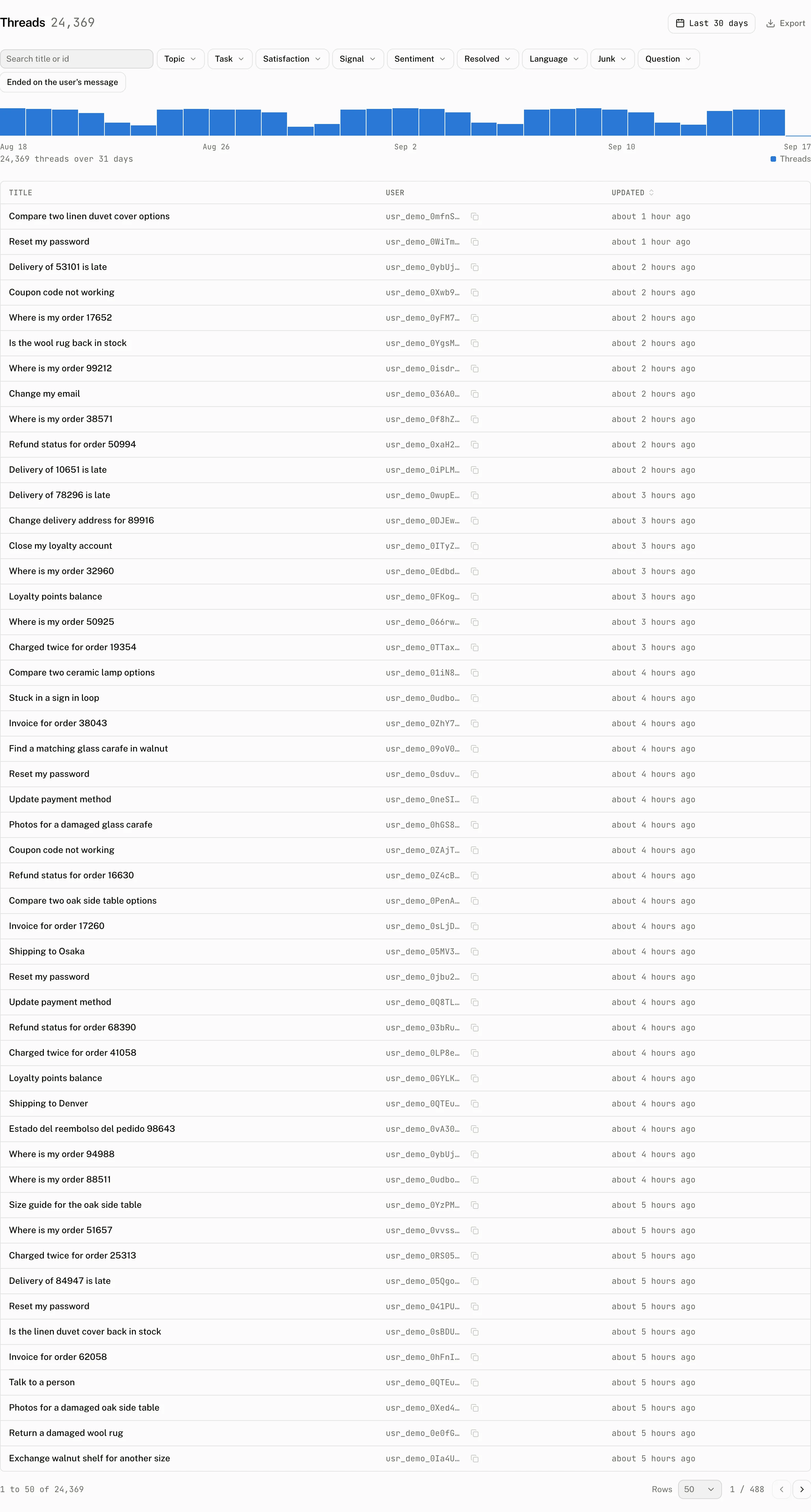
Search the conversation list
Archived threads are listed too, with an Archived mark beside the title: an end user archiving a thread is housekeeping on their side, and the thread's runs, cost and ratings still belong to the project, so a figure that links here opens exactly that many rows. The volume strip shows threads in each time bucket. Select a bar to narrow the list to that bucket.
Search matches a thread title or the full text of stored message content.
The table has Title, Topic, User, Tokens, Cost and Updated columns. Topic appears once conversations are classified. A thread's thumbs up and thumbs down counts and its latest review verdict appear as marks beside the title, only on the threads that have them. Tokens and Cost can be sorted. The table loads 50 rows at a time. Export appears on plans that include exports.
Filter by conversation and behaviour
The filter bar always shows Feedback, Review, Satisfaction, Signal, and Ended on the user's message. Other facets appear only when they have options in the selected range. Facet values describe the threads in that range, archived ones included.
| Facet | Values and reading |
|---|---|
| Topic | Analysed nonjunk topics, ordered by count. |
| Task | Analysed tasks. |
| Satisfaction | satisfied, mixed, dissatisfied or none, using the rule below. |
| Feedback | feedback=negative, feedback=positive or feedback=any. |
| Review | review=unreviewed, review=reviewed, review=good, review=needs_work or review=unclear. |
| Signal | A multiselect of the 12 interaction and analysis signals below. |
| Environment | Run environments, selecting threads with a run in that environment. |
| Sentiment | positive, neutral or negative. |
| Resolved | Resolved or unresolved analysis results. |
| Language | The 12 most common analysed languages. |
| Junk | Hide junk selects nonjunk threads. Only junk selects junk threads. |
| Question | Analysed questions, up to 50 options. |
| Ended on the user's message | Threads whose last message by creation time has the user role. |
| Signal value | Label | Reading |
|---|---|---|
stopped | Stopped | A run_stopped event. |
regenerated | Regenerated | A message_regenerated event. |
copied | Copied | A message_copied event. |
edited | Edited and resent | A message_edited event. |
attachment | Attached a file | An attachment_added event. |
suggestion | Clicked a suggestion | A suggestion_clicked event. |
branch | Switched branch | A branch_switched event. |
approved | Approved a tool | A tool_approved event. |
rejected | Rejected a tool | A tool_rejected event. |
error | Saw an error | An error_shown event. |
no_reply | No reply | The analysis found no assistant messages. |
loop | Repeated or rephrased | The analysis found an exact repeat or a rephrase. |
Satisfaction reads the thread's ratings first and its behaviour second. A thumbs up on any message makes the positive side true, and a thumbs down on any message makes the negative side true. A rating outranks behaviour: a copy or second turn is positive only on a thread with no thumbs down, and a stop, regeneration or edit is negative only on a thread with no thumbs up. A thread with both ratings is mixed.
positive = threads.thumbs_up OR (NOT threads.thumbs_down AND (threads.copied OR threads.run_count >= 2))
negative = threads.thumbs_down OR (NOT threads.thumbs_up AND (threads.stopped OR threads.regenerated OR threads.edited))
satisfied    = positive AND NOT negative
mixed        = positive AND negative
dissatisfied = negative AND NOT positive
none         = NOT positive AND NOT negative
Satisfied has only a positive side, Dissatisfied only a negative side, Mixed both, and No signal neither. A thumbs rating from an end user is never a review.
Review threads
Review is a second view next to List. A thread counts as reviewed once any person has reviewed it, and its verdict is the latest review recorded on it, whoever wrote it. The view uses the same filters as the list and reports the reviewed count out of the total threads in the current selection, counts for each verdict, agreement between that latest Good or Needs work verdict and the end user's thumbs on threads that have both, and the latest notes. These figures cover the threads selected by the filters, not the whole project.
Start reviewing opens the first unreviewed thread in the current filter and keeps the walk on unreviewed threads. Starting with Feedback set to Thumbs down is useful when reviewing dissatisfaction.
Inspect one thread
Select a row to open its detail page.
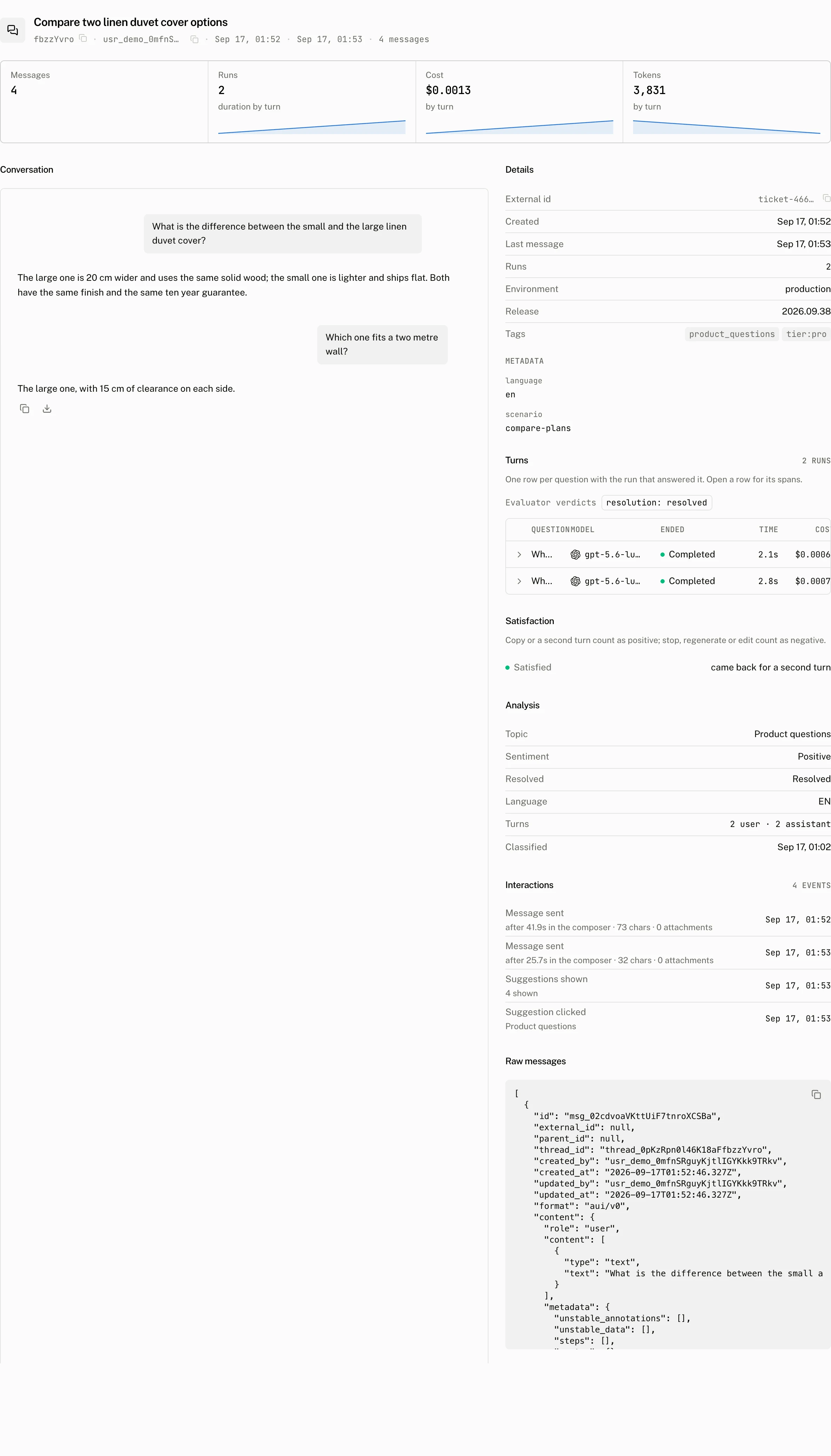
The top tiles are Messages, Runs, Cost and Tokens. The main column is Conversation, drawn by the dashboard or, once the project sets a Renderer URL, by your own app; Conversation views says what each draws. The right rail holds the rest of the thread's reports and analysis.
| Place | What it shows |
|---|---|
| Conversation main column | The rendered transcript. End user thumbs and their comments appear under the message they were given on. |
| Details tab | The details ledger, Satisfaction, and Analysis. Analysis includes Topic, Task, Phrasing, Sentiment, Resolved, Language, Turns, Repeats, Unanswered question, and Classified. |
| Turns tab | One row per question with the run that answered it. Open a run row to see its spans and Annotate action. |
| Activity tab | The engagement events for the thread. |
| Review tab | The verdict form and other reviewers' reviews. |
| Raw tab | The stored messages as JSON. |
The right rail has five tabs: Details, Turns, Activity, Review and Raw. It opens on Details; a thread opened from the Review view or from a list filtered by review state opens on Review instead. On the Review tab a person on the team records a verdict for the whole conversation: Good, Needs work or Unclear. They can add an optional note, then choose Save or Save and next. g, n and u choose the verdict. Mod+Enter saves and moves on. j and k move to the next and previous thread.
The header links back to the list the thread was opened from: Back to threads, Back to user, Back to topic or Back to task. It also includes Exit review while a review walk is active. Previous and Next stay within that list's range, filters and sort, including a user's threads or an Intelligence topic or task. The counter reads N of M outside review and N left of M in review. Each reviewer has one review per thread and can change it. The Save control reads Update once the viewer has a review. Other reviewers' reviews are listed below the form.
The Details tab has External id, when the thread has one and with a copy control, then Title, which reads how the thread got its name or why it has none, then Created, Last message and Runs. Environment and Release show the distinct values across the thread's runs and link to Runs filtered to that value. Tags are badges that link to Runs filtered to the tag. The Metadata ledger appears only when the thread has metadata.
| Title row | Meaning |
|---|---|
| Written by gpt-5.6-luna on the first message in 1.4s | The model, the trigger that titled the thread (on the client's request, on the first message or by the hourly sweep) and how long the call took. |
| Set by the client | The title came from a rename or a thread update. |
| Being written | An attempt is running. |
| Attempt 1 failed: Invalid API key. The hourly sweep retries. | The last attempt failed with the provider's error; the sweep retries up to three times. |
| Gave up after 3 attempts: Invalid API key | Every attempt failed. Rename the thread. |
| Waiting for the hourly sweep | No attempt yet; the sweep picks the thread up. |
| No user text to title | The thread has no user message with text; a message that holds only a file is not title input. |
| Titles are off for this project, Paused by the plan cap | The feature is off, or the gateway allowance is used up; see Thread titles. |
| No model configured for titles | The project has no configured title model. |
Export as Markdown appears on each assistant message and downloads only that message as message-<timestamp>.md.
Troubleshooting
| What you see | Why | What to do |
|---|---|---|
| A thread is missing from the list. | The active range, search and selected facets limit its rows. | Clear the list filters and choose a range that includes the conversation. |
| A facet is missing from the bar. | It is not one of the facets shown in every range, and it has no options in the selected range. | Widen the range or remove the filters that leave that facet with no options. |
| Satisfaction reads No signal. | The thread has no thumbs rating and neither a copy or second run nor a stop, regeneration or edit. Its stored satisfaction value is none. | Read the Activity and Turns tabs to see the events and runs behind the rule. |
| Analysis reads Not analysed yet. | No Intelligence pass has classified the thread: analysis is off, the thread is newer than the last pass, or it was stored as junk. | Check Settings › Intelligence and its runs ledger, or queue Run now. |