Upload images and documents from the composer, send them as message parts, and read them through short lived signed URLs.
Attachments let a user add an image or document to a composer before sending a message. Assistant Cloud issues a short lived upload URL, stores the object under the project, and keeps a signed read URL fresh wherever a message is listed or viewed.
How an attachment moves through the composer
The cloud thread list adapter supplies CloudFileAttachmentAdapter as its attachment adapter. Its picker accepts *, then the upload flow decides whether the selected file is supported.
The adapter adds a pending attachment with the status running, reason uploading, and progress 0. It asks cloud.files.generatePresignedUploadUrl for an upload URL with the file name.
The default adapter sends the file name. The upload route can also accept a content_type and content_length. When content_type is absent, it derives the type from a supported file name extension. The response carries signedUrl, expiresAt, publicUrl, and key.
The browser uploads the file body with PUT to signedUrl and sends the browser file's Content-Type. Content type is part of the signature. Content length is also signed when the upload request declared it.
After a successful PUT, the attachment changes to requires-action with the reason composer-send. It is uploaded and waiting for the user to send the composer. Removing it cancels the upload and aborts its request.
When the message is sent, an image attachment becomes an image part. Every other attachment becomes a file part with its MIME type and filename. The adapter guesses an attachment's kind from its content type: image/* is an image, text/* is a document, and every other type is a file.
An upload error changes the attachment to an incomplete error state. The adapter checks for cancellation at every stage, so an attachment that the user removes does not progress to the ready to send state.
Accepted files and storage
The upload route accepts these content types. Send content_type explicitly when the filename does not carry a supported extension. Otherwise the route uses the extension fallback.
| Kind | Accepted content types |
|---|---|
| Images | image/apng, image/avif, image/bmp, image/gif, image/heic, image/heif, image/jpeg, image/png, image/svg+xml, image/tiff, image/vnd.microsoft.icon, image/webp |
application/pdf | |
| Plain text and rich text | text/plain, text/csv, text/rtf, application/rtf |
| Microsoft Word | application/msword, application/vnd.openxmlformats-officedocument.wordprocessingml.document |
| Microsoft Excel | application/vnd.ms-excel, application/vnd.openxmlformats-officedocument.spreadsheetml.sheet |
| Microsoft PowerPoint | application/vnd.ms-powerpoint, application/vnd.openxmlformats-officedocument.presentationml.presentation |
| OpenDocument | application/vnd.oasis.opendocument.text, application/vnd.oasis.opendocument.spreadsheet, application/vnd.oasis.opendocument.presentation |
The upload request has these limits and naming rules.
| Item | Rule |
|---|---|
filename | Required, 1 to 255 characters. Its extension must not contain a path separator. |
content_type | Optional. It must be one of the accepted content types when supplied. |
content_length | Optional positive integer, at most 25 MiB. |
| Object key | attachments/<projectId>/<uuidv4>[.<ext>] |
| Object metadata | The original filename, user id, and project id. |
| Upload URL | Valid for 15 minutes. |
| Read URL | Valid for 15 minutes. |
The object store is private. Attachment URLs are replaced with signed reads rather than treated as durable read credentials. The message list route replaces every recognized attachment URL with a fresh 15 minute signed read. The project wide message list does the same, and the dashboard's thread page signs attachment URLs before it renders the message.
What the dashboard shows
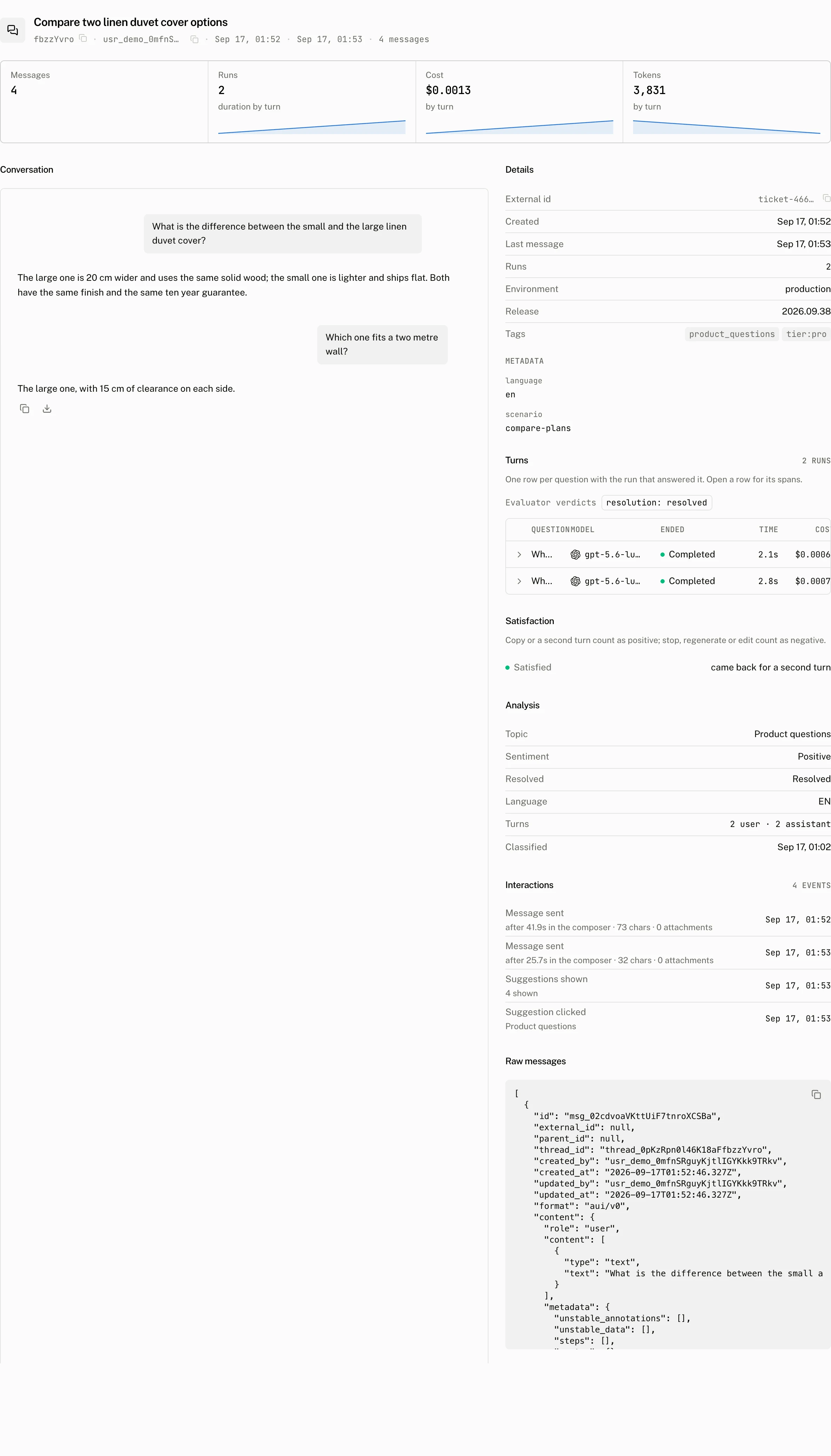
The dashboard's thread page renders the stored transcript in Conversation and includes a Raw tab for the stored message payload. Images reach that transcript as image parts. Other uploads reach it as file parts with their MIME type and filename. The thread page replaces attachment URLs with signed reads before rendering them.
From your code
The default adapter is CloudFileAttachmentAdapter. The cloud thread list adapter creates one as its attachments adapter, and the class accepts an AssistantCloud instance or a getter for one. Replace that attachment adapter when your application needs a different picker or upload flow while retaining the cloud thread history adapter.
Outside a composer, use cloud.files to request the same upload and read URLs. The upload URL is for the object transfer only. Your application decides when to put the returned URL into a message part.
const upload = await cloud.files.generatePresignedUploadUrl({
  filename: file.name,
});

await fetch(upload.signedUrl, {
  method: "PUT",
  body: file,
  headers: { "Content-Type": file.type },
});

const download = await cloud.files.generatePresignedDownloadUrl(
  upload.key ? { key: upload.key } : { url: upload.publicUrl },
);
The upload URL is signed for the content type the cloud derives from the filename extension, so the PUT must send that type; for a browser File with a standard extension that is file.type. generatePresignedUploadUrl returns { success, signedUrl, expiresAt, publicUrl, key }, and a response without key is read through the legacy url form. generatePresignedDownloadUrl accepts either { key } or the legacy { url } form and returns { signedUrl, expiresAt, key }.
You can make the same requests directly. The upload route creates a presigned URL, while the download route turns one project owned object key, or one legacy URL, into a new read URL.
POST /v1/files/attachments/generate-presigned-upload-url
Authorization: Bearer <token>
Content-Type: application/json

{
  "filename": "architecture.pdf",
  "content_type": "application/pdf",
  "content_length": 248921
}{
"success": true,
"signedUrl": "https://…",
"expiresAt": "2026-09-17T10:15:00.000Z",
"publicUrl": "https://…",
"key": "attachments/proj_0…/5de26af4-….pdf"
}POST /v1/files/attachments/generate-presigned-download-url
Authorization: Bearer <token>
Content-Type: application/json
{ "key": "attachments/proj_0…/5de26af4-….pdf" }{
"signedUrl": "https://…",
"expiresAt": "2026-09-17T10:15:00.000Z",
"key": "attachments/proj_0…/5de26af4-….pdf"
}The download request requires exactly one of key or the legacy url. A key outside attachments/<projectId>/, or a URL that does not parse as a configured attachment URL, returns 404 with Attachment not found.
Events, costs, and limits
The runtime records an attachment_added client event when the composer emits composer.attachmentAdd. It records attachment_failed when the composer emits composer.attachmentAddError. Each event includes props.type with the content type when it is known.
| Limit or status | Value |
|---|---|
| Maximum declared upload size | 25 MiB |
| Upload URL lifetime | 15 minutes |
| Download URL lifetime | 15 minutes |
| Upload route success | 201 |
| Download route success | 200 |
| Storage unavailable | 503 with Attachments are not configured on this deployment |
Retention deletes the messages that reference an attachment; the stored object itself is not part of the retention pass.
Troubleshooting
| What you see | Why | What to do |
|---|---|---|
Unsupported attachment type | The supplied content type is not accepted, and the file name did not identify a supported type. | Send one of the accepted content_type values, or use a filename with a supported extension. |
Attachments are not configured on this deployment | Object storage is unavailable to the attachment routes. | Configure storage before requesting an upload or download URL. |
| An image stops loading after 15 minutes | A read URL has expired. | Read the message again or request a new download URL. Each read produces a fresh signed URL. |
The PUT request is refused | The signed request binds the content type, and binds content length when it was declared. | Upload with the file's matching Content-Type, and keep a declared content_length at or below 25 MiB. |
| A download request fails validation | The request supplied both key and legacy url, or neither. | Supply exactly one selector. |
Attachment not found while requesting a download | The key is invalid or outside this project's attachment prefix, or the legacy URL does not parse as an attachment URL. | Use the key returned for this project, or a legacy URL from the configured attachment URL prefix. |