Collect message thumbs and write, read, and inspect named scores for threads, messages, and runs.
Feedback is a user judgement on one stored assistant message. A score is a named numeric, boolean, or categorical value on a message, thread, or run. Assistant Cloud records who authored each value, so feedback from an end user, a dashboard user, an API integration, and an evaluator can be distinguished.
Message feedback
The thread component installed with npx assistant-ui add thread shows thumbs up and thumbs down on assistant messages whenever its runtime has a feedback adapter. Assistant Cloud runtimes provide that adapter. It does not collect a comment. To collect one, add FeedbackDialog with npx assistant-ui add elements-feedback-dialog and pass its note to submitFeedback as comment.
An app that builds its own thread adds ActionBarPrimitive.FeedbackPositive and ActionBarPrimitive.FeedbackNegative to its action bar. The manual submission example below applies to a custom thread. The feedback adapter resolves the cloud thread and message ids before it submits the request.
await cloud.threads.messages.feedback(threadId, messageId, {
  type: "positive",
});
Feedback is a boolean score named feedback. A positive rating stores 1 and a negative rating stores 0. There is one feedback score for each user and message, so submitting feedback again updates that score and can flip its value.
Collecting a comment in a custom thread
Use this recipe when a custom thread needs to collect more detail after a thumbs down. It opens a small form and submits the current message's negative rating with the comment.
import { useAui } from "@assistant-ui/react";
import { useState } from "react";

export function FeedbackComment() {
  const aui = useAui();
  const [isOpen, setIsOpen] = useState(false);
  const [comment, setComment] = useState("");

  if (!isOpen) {
    return (
      <button
        type="button"
        aria-label="Leave negative feedback"
        onClick={() => setIsOpen(true)}
      >
        👎
      </button>
    );
  }

  return (
    <form
      onSubmit={(event) => {
        event.preventDefault();
        aui.message.submitFeedback({ type: "negative", comment });
        setIsOpen(false);
      }}
    >
      <label>
        What could be better?
        <textarea
          value={comment}
          onChange={(event) => setComment(event.target.value)}
          maxLength={2000}
        />
      </label>
      <button type="submit">Submit feedback</button>
    </form>
  );
}
The runtime trims the comment and sends none when it is blank. Assistant Cloud accepts 1 to 2,000 characters, and a longer comment receives a 400 response. It stores an accepted comment with the rating and shows it on the thread in the dashboard. An Assistant Cloud server older than the release that added comment rejects the field with a 400, so a self-hosted installation upgrades the server before the client sends comments. Rating again without a comment keeps the stored one; switching between thumbs up and thumbs down clears it. The message's local submittedFeedback metadata mirrors the last submitFeedback call, so after such a repeat it carries no comment while the cloud still holds one.
The client sends the following request. Both path ids accept 1 to 255 characters, and the strict body requires type to be "positive" or "negative" and accepts an optional comment.
POST /v1/threads/{thread_id}/messages/{message_id}/feedback
Content-Type: application/json

{ "type": "positive" }| Status | Body | When |
|---|---|---|
200 | { "feedback_id": "score_…", "type": "positive", "comment"?: string | null } | The feedback score was stored. |
400 | { "error": "Schema validation error", "details": […] } | The required body failed validation. |
404 | { "error": "Thread not found" } | The thread is not available to the caller. |
404 | { "error": "Message not found" } | The message is not available in that thread. |
When a feedback click is skipped
The runtime submits feedback without throwing into the interface. It warns and returns before making a request in these two cases.
| Condition | Warning |
|---|---|
| The thread has no remote id. | [assistant-ui] Skipping feedback for message ${message.id}: the thread has no remote id. |
| The message has no mapped cloud message id. | [assistant-ui] Skipping feedback for message ${message.id}: no cloud message id is mapped. |
If the request itself is rejected, the adapter logs [assistant-ui] Cloud feedback submission failed:.
Write a score
Use cloud.scores.create to attach a score from your application. The client sends POST /v1/scores.
const score = await cloud.scores.create({
  name: "answer_relevance",
  data_type: "numeric",
  value: 0.82,
  comment: "Evaluated after the response completed",
  run_id: runId,
});
The request body is strict. Unknown fields are refused.
| Field | Required | Rules |
|---|---|---|
name | Yes | 1 to 64 characters. It matches ^[A-Za-z0-9_.-]+$. |
data_type | Yes | numeric, categorical, or boolean. |
value | Depends on data_type | Required and numeric for numeric. For boolean, it accepts true, false, 1, or 0 and is stored as 1 or 0. It is forbidden for categorical. |
string_value | Depends on data_type | Required for categorical, 1 to 255 characters, and forbidden for numeric and boolean. |
comment | No | 1 to 2,000 characters when present. |
thread_id, message_id, run_id | One target | Each id is 1 to 48 characters. The target combinations below are the only valid choices. |
Every score targets exactly one thing.
| Target | Required fields | Fields that must be absent |
|---|---|---|
| Message | message_id and thread_id | run_id |
| Run | run_id | thread_id, message_id |
| Thread | thread_id | message_id, run_id |
With no target, the request is refused with "a score must target a message, run, or thread". With an invalid combination, it is refused with "a score must target exactly one message, run, or thread".
| Status | Body | When |
|---|---|---|
201 | { score_id, name, data_type, value, string_value } | The score was stored. value is a number or null; string_value is a string or null. |
400 | { "error": "Schema validation error", "details": […] } | A field or data type rule failed validation. |
400 | { "error": "message_id must belong to thread_id" } | The message is not in the supplied thread. |
404 | { "error": "Thread not found" } | The thread target is not available to the caller. |
404 | { "error": "Run not found" } | The run target is not available to the caller. |
Source, author, and replacement
The API does not accept a caller supplied source. It records the source and author from the writing path.
| Source | Who writes it | Author |
|---|---|---|
end_user | An end user through message feedback or a JWT authenticated POST /v1/scores request. | The authenticated user. |
api | A server using an API key with POST /v1/scores. | The authenticated API caller. |
human | The dashboard's manual score procedure, including conversation reviews. | The viewer who creates the score. |
evaluator | An evaluator rule's verdict. | The evaluator rule. |
An API key can score any thread in its project. A JWT score write first checks that the user owns the thread. For every path, a write with the same target, name, and author replaces the earlier value and updates its timestamp. The dashboard's manual score procedure records human, uses the viewer as author, and upserts on the most specific target.
Conversation reviews
On the dashboard thread page, a team member can record a verdict for the whole conversation as Good, Needs work, or Unclear, with an optional note. It is stored as a score with name: "review", source: "human", data_type: "categorical", and a string_value of good, needs_work, or unclear. The note is stored in comment. A review targets the thread, with no message or run, and there is one review for each reviewer and thread.
Reviews are returned through the score list endpoints like every other score. Use the name=review filter to list them. An end user's thumb is a feedback score and is never a review.
Read scores
The project read API is API key only. GET /v1/projects/scores returns scores newest first by created_at and id.
GET /v1/projects/scores?thread_id={thread_id}&name=answer_relevance&limit=50curl "https://backend.assistant-api.com/v1/projects/scores?thread_id=thread_0qzof3jPoDwr7K3agyJN3D4U&name=answer_relevance&limit=50" \
-H "Authorization: Bearer $ASSISTANT_API_KEY" \
-H "Aui-User-Id: user_123" \
-H "Aui-Workspace-Id: workspace_acme"import os
import requests
headers = {
"Authorization": f"Bearer {os.environ['ASSISTANT_API_KEY']}",
"Aui-User-Id": "user_123",
"Aui-Workspace-Id": "workspace_acme",
}
limit = 50
after = None
while True:
params = {"name": "answer_relevance", "limit": limit}
if after:
params["after"] = after
response = requests.get(
"https://backend.assistant-api.com/v1/projects/scores",
headers=headers,
params=params,
timeout=30,
)
response.raise_for_status()
scores = response.json()["scores"]
for score in scores:
print(score)
if len(scores) < limit:
break
after = scores[-1]["id"]| Query | Rules |
|---|---|
name | 1 to 64 characters. |
thread_id, run_id | 1 to 48 characters. |
since | An ISO 8601 datetime. |
limit | 1 to 200. Default 50. |
after | A score id cursor of 1 to 48 characters. |
Each returned score includes its id, target ids, name, data type, numeric and string values, source, author id, comment, and timestamps. This route does not accept a source filter and does not return next_cursor.
The API key only MCP server exposes the same project through list_scores. Its result is { scores, next_cursor }.
| MCP input | Rules |
|---|---|
thread_id, run_id | Optional, 1 to 48 characters. |
name | Optional, 1 to 64 characters. |
source | Optional: end_user, human, evaluator, or api. |
limit | 1 to 100. Default 50. |
cursor | Optional cursor of 1 to 512 characters. |
Scores in the dashboard
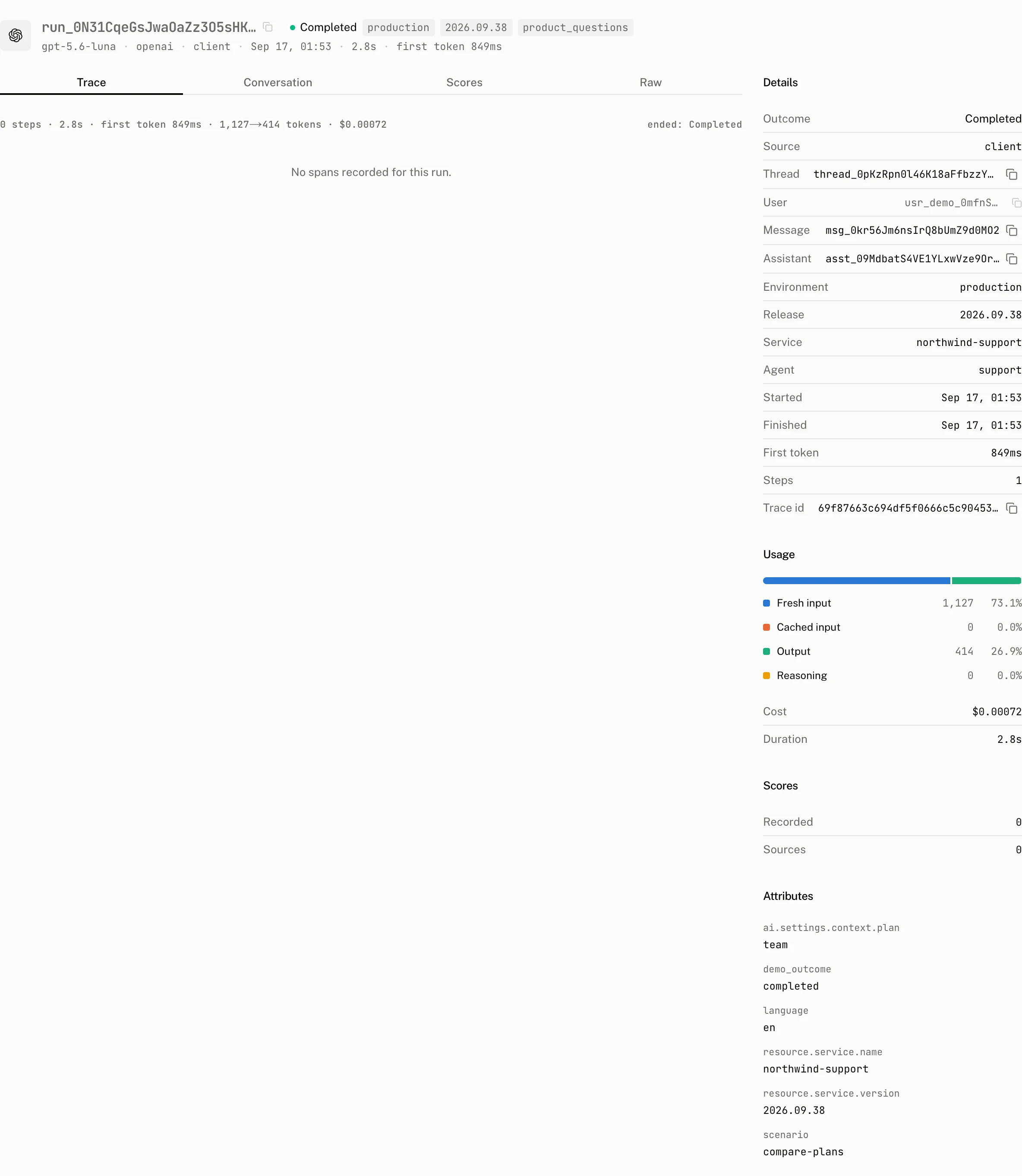
The run page has a Scores section with Recorded and Sources, alongside run details, usage, attributes, and the trace waterfall. The thread page reads scores for its thread together with the conversation, turns, satisfaction, and interactions.
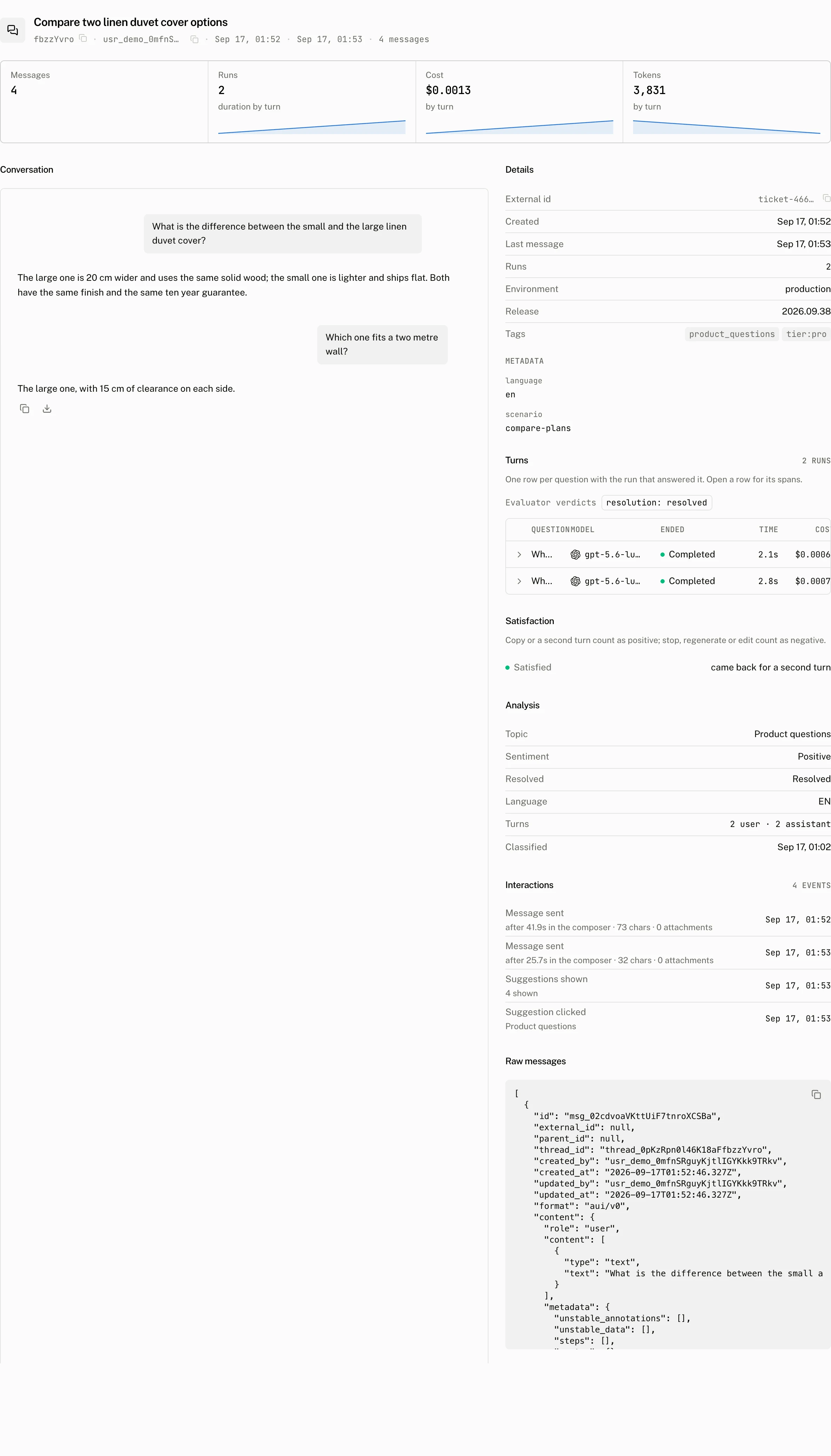
Feedback appears under the rated message on the thread page, in the Feedback filter and column of Threads, in the Feedback block at the top of Engagement, and in the Rated threads and Thumbs down tiles of the Overview. For satisfaction, a thumbs rating outranks behaviour. Without a thumbs rating, a copy or a second turn counts as positive, and a stop, regenerate, or edit counts as negative.
The Intelligence page includes Evaluator verdicts. It shows Not judged yet until the next analysis run for sections that do not have a judgement.
Troubleshooting
| What you see | Why | What to do |
|---|---|---|
| A feedback click logs a skip warning | The thread or message has not acquired its cloud id. | Wait for the message to be stored, then submit feedback on that stored message. |
Feedback answers Thread not found or Message not found | The path does not identify a message available to the caller. | Use the stored thread and message ids for the current caller. |
| A score request answers a target error | It supplied no target or more than one target combination. | Send a message with its thread, a run alone, or a thread alone. |
| A categorical score is rejected | It used value, omitted string_value, or used a label outside the allowed length. | Send a 1 to 255 character string_value and omit value. |
| You need to filter project scores by source | GET /v1/projects/scores has no source filter. | Use the MCP list_scores tool with source. |
| Evaluator verdicts are not visible | The section has not been judged yet. | Wait for the next analysis run. |