Record the actions users take around an answer, how events reach Assistant Cloud, and how the dashboard turns them into engagement signals.
Engagement events record what a user does around an answer, such as sending, editing, stopping, copying, or approving a tool. They contain interaction metadata rather than message text. Feedback comments are stored with their ratings, not as engagement events. The assistant-ui cloud runtime reports these events automatically, and the dashboard uses them to show engagement and satisfaction. For explicit message feedback and application scores, see Feedback and scores.
How events are recorded
The runtime subscribes once per thread list to its composer, message, thread, and store events at the root scope, so a visited thread that stays mounted in the background adds no second listener and a run that ends after the user switched away is still recorded. Each event is attributed by the thread id it carries. An event for a thread the list does not know is dropped rather than sent without a thread. It reports these 16 kinds.
| Kind | Runtime trigger | value | props | Delivery rule |
|---|---|---|---|---|
message_sent | composer.send when payload.messageId is absent. | Milliseconds since the thread's previous run ended, when known. | { chars, attachments } | This is the only event resolved with a remote thread wait, so it may create the cloud thread. |
message_edited | composer.send when payload.messageId is present. | None. | { chars } | |
suggestion_clicked | composer.send when payload.suggestion is truthy. | None. | None. | |
attachment_added | composer.attachmentAdd. | None. | { type } when the content type is known. | |
attachment_failed | composer.attachmentAddError. | None. | { type } when the content type is known. | |
run_stopped | composer.cancel or thread.cancelRun. | Milliseconds that the run had been running. | None. | It is suppressed when the runtime has no recorded run start. |
message_regenerated | message.reload. | None. | None. | |
branch_switched | message.branchSwitched. | None. | None. | |
message_copied | message.copied. | None. | None. | |
tool_approved | thread.toolApprovalAnswered with payload.approved === true. | None. | { toolCallId, toolName } | Emitted when the approval answer is given. |
tool_rejected | thread.toolApprovalAnswered with payload.approved === false. | None. | { toolCallId, toolName } | Emitted when the approval answer is given. |
speech_started | message.speak. | None. | None. | |
voice_started | thread.voiceStarted. | None. | None. | |
error_shown | message.error. | None. | { reason } | Once per run. A new run start clears that run's error record. |
suggestions_shown | A store watcher finds that the main thread is empty and has suggestions.length > 0. | The suggestion count. | None. | Once per thread. |
thread_switched | threads.selectionChanged. | None. | None. | Dropped when the selected thread has no remote id. |
The runtime also remembers when each run starts and ends. That timing supplies the message_sent gap and the run_stopped duration. It keeps the remembered run endings, shown errors, and shown suggestions for up to 256 threads.
Delivery, validation, and storage
cloud.events.track adds a normalized event to a local buffer and returns immediately. The client flushes as soon as 20 events are waiting, after a two second debounce, on the pagehide event, when document visibility becomes hidden, and when you call dispose(). A request carries at most 50 events and uses keepalive: true; dispose() removes the listeners, clears its timer, and flushes the buffer. Delivery never blocks the interface. A failed scheduled or 20-event flush retries after 250 milliseconds and then 1,000 milliseconds. A page-exit, hidden-page, or dispose() flush sends once and ends a pending retry.
Before buffering, the client applies these limits.
| Field | Normalization |
|---|---|
thread_id, message_id, run_id | An empty id or an id longer than 48 characters is omitted. |
value | Kept only when it is a nonnegative integer. |
props | Omitted as a whole when any value is not a string, finite number, or boolean; when a string is longer than 256 characters; or when the JSON encoding is larger than 1,024 bytes. |
The endpoint is POST /v1/events with { events }. The server accepts 1 to 50 events, validates each value as an integer from 0 to 2,147,483,647, and accepts property keys of 1 to 64 characters. It silently drops an event that names a thread the caller does not own, while keeping the rest of the batch. A successful request answers 202 with { "accepted": n }, where n is the number stored.
The event endpoint is limited to 600 requests per 60 seconds for each user. At the limit it answers 429, { "error": "rate_limited" }, and a Retry-After header.
The cloud keeps the raw event rows and a daily rollup by project, UTC day, user, and kind. The rollup records a count, a value sum, and a value count. It also keeps four thread flags from event kinds: copied, stopped, regenerated, and edited.
What the dashboard derives
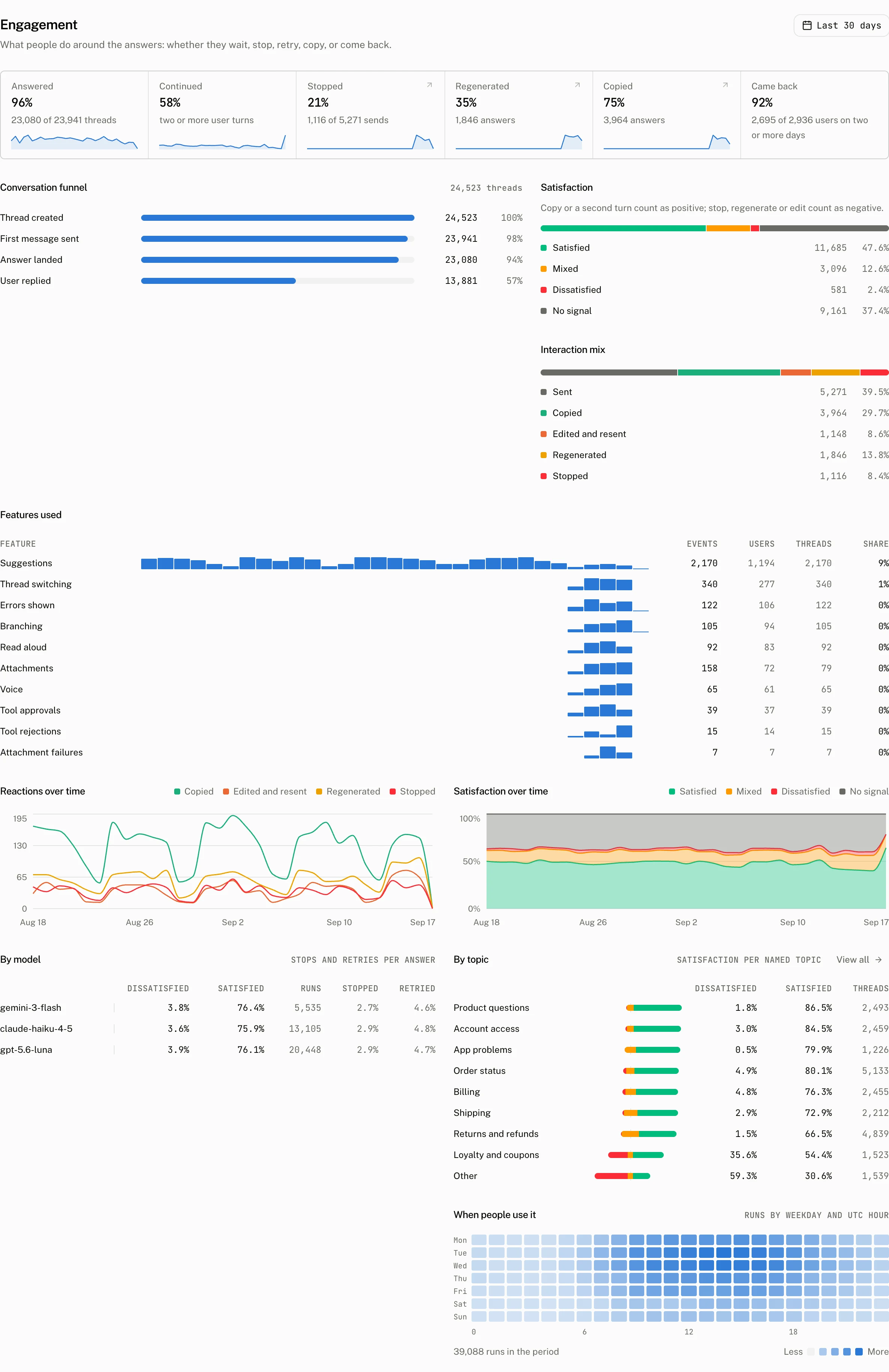
The dashboard's satisfaction value is a rule over the thread's ratings, flags, and run count, not a model judgement. A thumbs up on any message makes the positive side true, and a thumbs down on any message makes the negative side true. A rating outranks behaviour: positive behaviour counts only on a thread with no thumbs down, and negative behaviour only on a thread with no thumbs up. A thread with both ratings is mixed.
positive = threads.thumbs_up OR (NOT threads.thumbs_down AND (threads.copied OR threads.run_count >= 2))
negative = threads.thumbs_down OR (NOT threads.thumbs_up AND (threads.stopped OR threads.regenerated OR threads.edited))
satisfied    = positive AND NOT negative
mixed        = positive AND negative
dissatisfied = negative AND NOT positive
none         = NOT positive AND NOT negative
The signal filter on Threads uses these values.
| Signal | Event or rule | Label |
|---|---|---|
stopped | run_stopped | Stopped |
regenerated | message_regenerated | Regenerated |
copied | message_copied | Copied |
edited | message_edited | Edited and resent |
attachment | attachment_added | Attached a file |
suggestion | suggestion_clicked | Clicked a suggestion |
branch | branch_switched | Switched branch |
approved | tool_approved | Approved a tool |
rejected | tool_rejected | Rejected a tool |
error | error_shown | Saw an error |
no_reply | A named thread has no assistant message. | No reply |
loop | A thread has exact repeats or a rephrased turn. | Repeated or rephrased |
What the Engagement page shows
Engagement answers what people do around responses. It opens with the Answered, Continued, Stopped, Regenerated, Copied, and Came back tiles, then shows the Feedback block. It then shows the conversation funnel, the satisfaction split, interaction mix, reactions and satisfaction over time, results by model and topic, and an hour by weekday heatmap. Features used groups attachment use, suggestion impressions and clicks, branching, tool approvals and rejections, read aloud, voice input, thread switching, errors shown, and attachment failures.
From your code
Use cloud.events.track when your UI has an interaction that the runtime does not report. The call joins the next delivery batch.
cloud.events.track({
  kind: "suggestion_clicked",
  thread_id: threadId,
  props: { source: "sidebar" },
});cloud.events.track({
kind: "error_shown",
thread_id: threadId,
value: 1,
props: { code: "upstream_timeout" },
});After delivery, the event appears in the thread page's Activity tab and in the Engagement page's counts.
To keep run reports while turning off engagement events, set events to false. Set telemetry itself to false to turn off both run reports and events.
import { AssistantCloud } from "assistant-cloud";

const cloud = new AssistantCloud({
  baseUrl: process.env.NEXT_PUBLIC_ASSISTANT_BASE_URL!,
  anonymous: true,
  telemetry: { events: false },
});
Troubleshooting
| What you see | Why | What to do |
|---|---|---|
| No new events | Telemetry is off, or telemetry.events is false. | Enable telemetry, or remove the events override. |
| An interaction is absent from the dashboard | The event named an unknown or unowned thread, so the server silently dropped it. | Send the cloud thread id for the current user. |
| The last interaction is missing after navigation | The flush made when the page hides or unloads was not delivered; it is sent once and never retried. | Let the scheduled flush run before navigating away. |
| Satisfaction has no signal | The thread has no thumbs rating and none of the positive or negative behaviour facts in the satisfaction rule. | A thumbs up or a copy or second run supplies a positive fact; a thumbs down or a stop, regeneration, or edit supplies a negative fact. |
| The Satisfaction column lacks negative readings | The events client has not reported stops, regenerations, or edits. | Use the assistant-ui cloud client that emits those events. |