The report sent for an assistant response, its limits and outcomes, and how it becomes a run in Assistant Cloud.
Every persisted assistant response can send one run report to Assistant Cloud. The report records the response, model work, tools, timing, deployment dimensions, and errors. A report the SDK builds carries the assistant's text and the tool arguments and results, never the user's message content. The report can link to a stored prompt through user_message_id. A report you send yourself can add steps[].input, which stores whatever you put there, a user's prompt included. The dashboard turns that record into the Runs, Models, Users, and Overview views.
Reports can contain assistant text, tool arguments and results, step input and error text, and tool arguments often quote the user. Use beforeReport to remove or redact those values before they leave the app, or turn telemetry off when the project should store threads and messages without reports or engagement events.
What a report accepts
cloud.runs.report() sends POST /v1/runs. thread_id and status are required. Every other field is optional, but the endpoint validates its type and bound before it writes the run.
| Field | Type and bound | Meaning |
|---|---|---|
thread_id | string, 1 to 255 characters | The cloud thread the run belongs to. |
status | completed, incomplete, or error | The terminal state of the response. |
message_id | string, 1 to 48 characters | The persisted assistant message that produced the run. |
user_message_id | string, 1 to 48 characters | The persisted user message that started the turn. It must belong to thread_id. |
outcome_type | rate_limited, validation_failed, provider_error, server_error, budget_denied, persistence_error, aborted, timeout, disconnected, length, or content_filter | The more specific reason for a noncompleted response. |
error_code | string, 1 to 64 characters | A machine readable failure code. |
error | string, 1 to 2,048 characters | The failure message. |
tags | Up to 20 distinct nonempty strings, each trimmed to 1 to 64 characters | Labels for filtering runs. |
environment | string, 1 to 64 characters | The deployment environment. |
release | string, 1 to 255 characters | The application release. |
total_steps | integer, 0 or more | The number of model steps when steps is not supplied. |
steps | Array of up to 1,000 step objects | The model steps in the response. Step fields defines each object. |
tool_calls | Array of up to 1,000 tool call objects | Tool invocations outside a step, with optional nested sampling calls. Tool call fields defines each object. |
input_tokens, output_tokens, reasoning_tokens, cached_input_tokens | Integer from 0 to 100,000,000 | Whole run usage. |
model_id | string, 1 to 255 characters | The model identifier reported by the producer. |
provider | string, 1 to 255 characters | The provider that served the model. |
provider_type | string, 1 to 255 characters | Legacy alias for provider. It becomes provider only when provider is absent, then is removed. |
duration_ms, first_token_ms | Integer, 0 or more | Elapsed time to completion and to the first token. |
cost_details | Object with optional finite, nonnegative input, input_cached_tokens, output, and total numbers | Caller supplied cost components. When the object is not empty, the run cost becomes total, or the sum of input, input_cached_tokens, and output when total is absent, and cost_usd is ignored. |
cost_usd | Finite number, 0 or more | Caller supplied total cost, used when cost_details is absent or empty. It takes precedence over catalog pricing. |
output_text | string, up to 50,000 characters | The assistant text shown with the run. |
metadata | Record with string keys and values of any type | Legacy alias for attributes. |
attributes | Record with string keys and values of any type | Run attributes shown in the run detail view. |
trace_id | string, 1 to 48 characters | A trace identifier. A valid W3C value merges the report with server spans that share it. |
root_span_id | 16 lowercase hexadecimal characters | The root span identifier when the caller has one. |
Step fields
Each steps item may include the following fields. Step usage has the same integer 0 to 100,000,000 bound as run usage.
| Field | Type and bound | Meaning |
|---|---|---|
input_tokens, output_tokens, reasoning_tokens, cached_input_tokens | Integer from 0 to 100,000,000 | Usage for that model step. |
tool_calls | Array of up to 1,000 tool call objects | The tool calls made in the step; Tool call fields defines each object. |
start_ms, end_ms | Integer, 0 or more | The step offsets from the start of the run. |
finish_reason | string, up to 32 characters | The model's finish reason for that step. |
input | string, up to 50,000 characters | The model input captured for the step. |
Tool call fields
Each tool_calls item has a required name. The service generates tool_call_id when it is omitted.
| Field | Type and bound | Meaning |
|---|---|---|
tool_name | string, 1 to 255 characters | The invoked tool. |
tool_call_id | string, 1 to 255 characters | The tool invocation id. |
tool_args, tool_result | string, each up to 50,000 characters | The tool arguments and returned value. The SDK serializes them as JSON and truncates them at the limit. |
tool_source | mcp, frontend, or backend | Where the tool was provided. |
start_ms, end_ms | Integer, 0 or more | The tool offsets from the start of the run. |
sampling_calls | Array of up to 1,000 sampling call objects | Nested model calls made by this tool. |
Each sampling_calls item may have model_id of up to 255 characters, the four usage counters from 0 to 100,000,000, and duration_ms as an integer of 0 or more.
Attributes and size limits
The service combines metadata, unknown top level keys, and attributes in that order. Later attributes values win. The resulting attributes JSON must be at most 16,384 bytes. Unknown top level keys are kept as attributes instead of being rejected, so a newer SDK can send fields an older project does not yet recognize.
The route rejects invalid input with { "error": "Schema validation error", "details": […] }, details listing the failed checks. It answers { "error": "message_id must belong to thread_id" } or { "error": "user_message_id must belong to thread_id" } when the corresponding message is not in the named thread, { "error": "user_message_id must name a user message" } when the prompt has another role, and { "error": "Thread not found" } when the thread is not visible to the caller.
How the SDK builds a report
The thread history adapter reports a terminal assistant message after persistence. It combines the message derived state with the extracted format data, resolves the remote message id, and sends the resulting report. A message derived status and outcome take precedence over values extracted from the stored format.
| Integration | What it reports | What it cannot supply by itself |
|---|---|---|
Local runtime with aui/v0 | Status, outcome, error, first token time from metadata.timing, text, tool calls, and metadata based usage, model, provider, and trace id. Tool calls have no tool_source. | Run duration and step timing. Server model, provider, usage, and trace values unless the adapter places them in metadata.custom. |
AI SDK runtime with ai-sdk/v6 | The same message state and first token time, client duration and step timing, text across assistant messages, steps, tool calls, sampling calls, and usage. Static tools are frontend, dynamic tools are mcp, and a step that calls a tool is marked tool-calls. | The provider finish reason for each step. It only observes the stored message. |
| LangGraph, LangChain, and Google ADK | The cloud thread list, titles, a copy of settled messages, feedback, and engagement when configured with a cloud client. | Run reports, because the model work happens on the server. Send traces for it. |
For both message formats, report construction reads only assistant messages. A message waiting for tool approval is not reported, so a paused run is not counted as completed or reported twice. The AI SDK runtime also reports a run that ends without an assistant message: a request that fails before streaming reports its error, a run stopped before its first token reports aborted, and a run that ends without any output reports incomplete with no outcome type. None of these reports carries a message_id, because no assistant message was stored. The AI SDK runtime supplies user_message_id when the prompt is stored, including when its append is still pending at report time. A failed or unmapped append omits that field without suppressing the report. If an early stop deletes the prompt, the runtime omits user_message_id so the report cannot reference the deleted message.
messageMetadata values
An AI SDK route must return server values through messageMetadata. The client cannot infer model, provider, usage, or trace id from the browser stream. The whole route, with the callback that fills the report:
import { convertToModelMessages, streamText } from "ai";
import { openai } from "@ai-sdk/openai";

export async function POST(req: Request) {
  const { messages } = await req.json();
  const model = openai("gpt-6-luna");
  const result = streamText({
    abortSignal: req.signal,
    model,
    messages: await convertToModelMessages(messages),
  });

  return result.toUIMessageStreamResponse({
    messageMetadata: ({ part }) => {
      if (part.type === "finish") {
        return { usage: part.totalUsage, finishReason: part.finishReason };
      }
      if (part.type === "finish-step") {
        return { modelId: part.response.modelId, provider: model.provider };
      }
      return undefined;
    },
  });
}
Each key the callback returns maps to a report field:
| Metadata key | SDK behavior |
|---|---|
usage | Becomes the four run usage counters. It reads inputTokens or promptTokens, outputTokens or completionTokens, reasoningTokens or outputTokenDetails.reasoningTokens, and cachedInputTokens or inputTokenDetails.cacheReadTokens. When usage is absent, the SDK sums steps[].usage. |
steps | Supplies per step usage for the AI SDK extractor. |
modelId | Becomes model_id. A route can return it for a finished step. |
provider | Becomes provider. |
finishReason | Supplies the outcome derivation unless the assistant message is already incomplete. |
traceId | Becomes trace_id. For aui/v0, put it in metadata.custom.traceId; for ai-sdk/v6, put it in metadata.traceId. |
samplingCalls | A record keyed by tool call id. Each value becomes the matching tool call's sampling_calls. |
The docs chat route illustrates the handoff. It adds modelId at finish-step, adds usage at finish, and wraps that callback with withAssistantCloudTraceMetadata so the start part carries traceId.
How status and outcome are derived
The SDK derives a status before it creates the report. The first matching input wins: isError, then isAbort, then isDisconnect, then finishReason. With no matching input, the fallback status is completed.
Input or outcome_type | Resulting status | Produced today |
|---|---|---|
isError: true, or finishReason: "error" | error, with the outcome type of the error's HTTP status, if any | The SDK when the persisted message is incomplete for error. |
isAbort: true, finishReason: "cancelled", or aborted | incomplete | The SDK. |
isDisconnect: true or disconnected | incomplete | No shipped integration produces it today. The core runtimes do not observe the live connection. |
length | incomplete | The SDK from a message finish reason, and server spans. |
content_filter | incomplete | The SDK from content-filter or content_filter, and server spans. |
rate_limited, validation_failed, or server_error | error | The SDK from the failed request's HTTP status, which also becomes error_code: 429 gives rate_limited, 400 or 422 gives validation_failed, and 5xx gives server_error. Runs executed by an Assistant Cloud assistant also produce rate_limited and server_error. |
timeout or provider_error | error | Only runs executed by an Assistant Cloud assistant. |
persistence_error | error | The SDK when storing a completed turn in thread history fails. The failed write's message becomes error and its code becomes error_code. A stopped or failed turn keeps its own outcome. |
budget_denied | error | No integration produces this value today. It remains valid filter vocabulary. |
The Overview outcome chart groups values differently from the report vocabulary: completed, stopped for aborted, disconnected, truncated for length or content_filter, failed for every other outcome type, and unknown when there is no outcome type.
Normalization and delivery
createRunReport converts the runtime shaped input into the wire shape. It lowercases traceId and keeps it only when it is exactly 32 lowercase hexadecimal characters. It writes the provider to both provider and the legacy provider_type field, converts camel case fields to their wire names, makes total_steps equal steps.length when steps are present, and rounds finite timing values to the nearest nonnegative integer. Nonfinite timing values are omitted.
outputText and each step input are truncated at 50,000 characters. A message derived error is truncated at 2,048 characters and its code at 64 characters. A directly supplied report must still meet the route's 2,048 character error bound. Tags are trimmed, limited to 64 characters, deduplicated, and capped at 20. Empty usage stays absent rather than becoming four zeroes.
CloudRunReporter follows one delivery order:
- Return when telemetry is disabled or a supplied deduplication key was already sent.
- Build and normalize the report with the cloud telemetry configuration.
- Call
beforeReportlast. A returnednullskips the request before claiming the deduplication key. A thrown callback is swallowed. - Claim the key, when one was supplied, then send the report.
The reporter swallows send failures. It releases a claimed key only after a 429 response, so a later observation may send that report again. It does not retry any other failure, and the standard thread history path supplies no key.
Deployment dimensions and clients
environment, release, and tags in the telemetry configuration are stamped on each client report. They become Run facets. release is your application version, not an SDK version.
const cloud = new AssistantCloud({
  baseUrl: process.env.NEXT_PUBLIC_ASSISTANT_BASE_URL!,
  anonymous: true,
  telemetry: {
    environment: "production",
    release: "2026.09.1",
    tags: ["web", "eu"],
  },
});
Every request also sends Aui-Sdk. It begins with assistant-cloud/<version>, followed by registered integration identities in registration order. The client accepts any printable name and version token. The cloud reads only the first 8 space separated tokens and records unique lowercase npm style names with strict SemVer versions, discarding duplicates. Recorded names are at most 214 characters and versions are at most 64 characters.
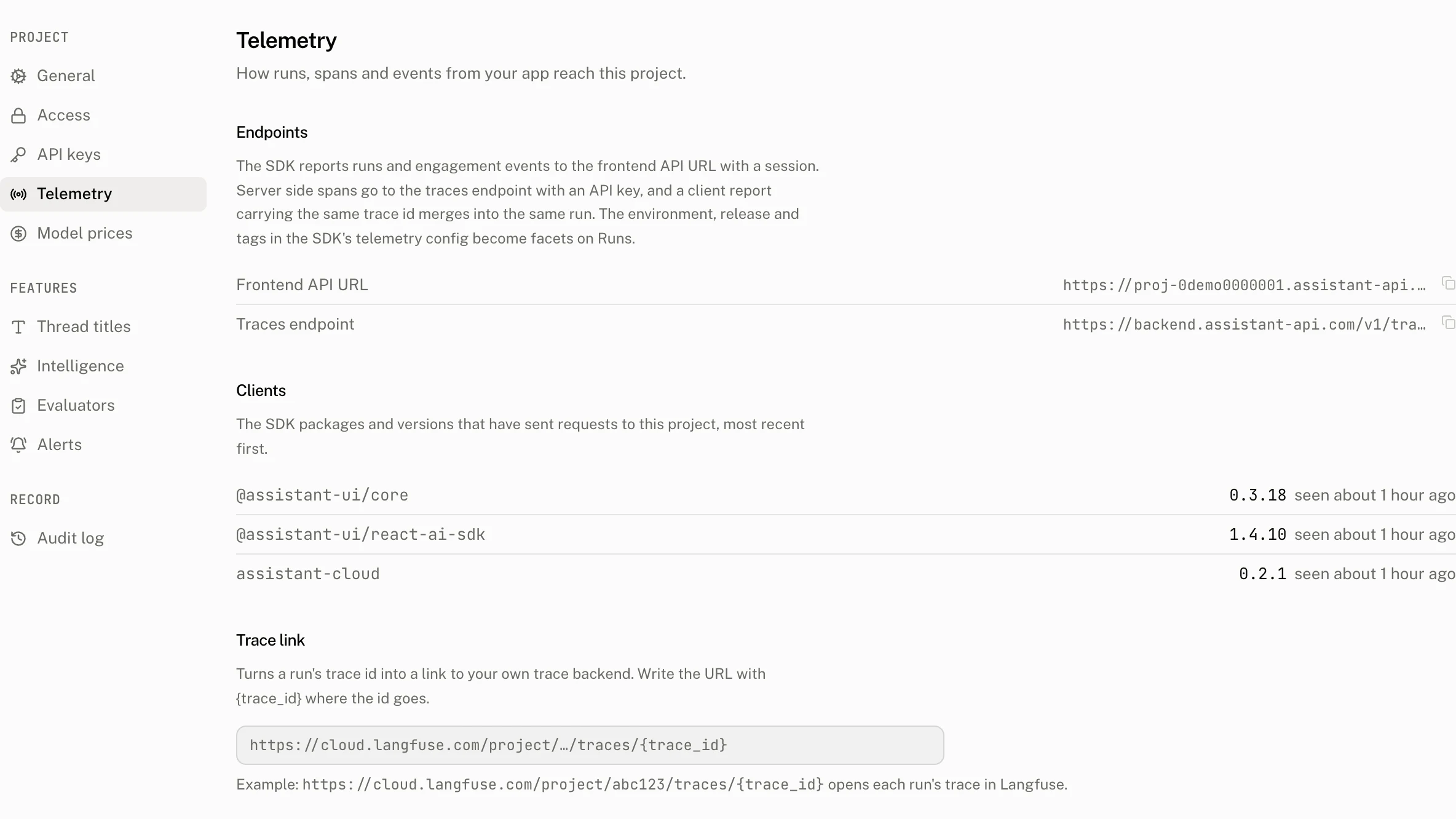
Settings › Telemetry lists those client names and versions, newest first, with the last time each was seen. A client entry is recorded at most once in 10 minutes and retained for 180 days. The page also gives the project API URL, the trace receiver URL, and the trace link template that turns a run's trace id into a link to your observability system.
When a client report meets server spans
A report with a valid W3C trace_id locks and merges into the existing run for the same project and trace id. Either side may arrive first.
| Field family | Merge rule |
|---|---|
message_id and user_message_id | The client report writes them when the existing run has the same thread or no thread. |
tags | The client report writes them. |
outcome_type | The client may write only aborted or disconnected. |
thread_id | The client writes it only when the server run has no thread. |
created_by | The client writes it only when the server run belongs to the unknown telemetry user. |
environment and release | The client writes each only when the server has no value. |
first_token_ms | The client writes it only when the server value is absent. The client value is always copied to attributes.client.first_token_ms. |
| Model, provider, usage, duration, steps, and server span data | The server keeps these values. |
The merge replays the daily run rollup when a changed field affects it.
What the dashboard derives
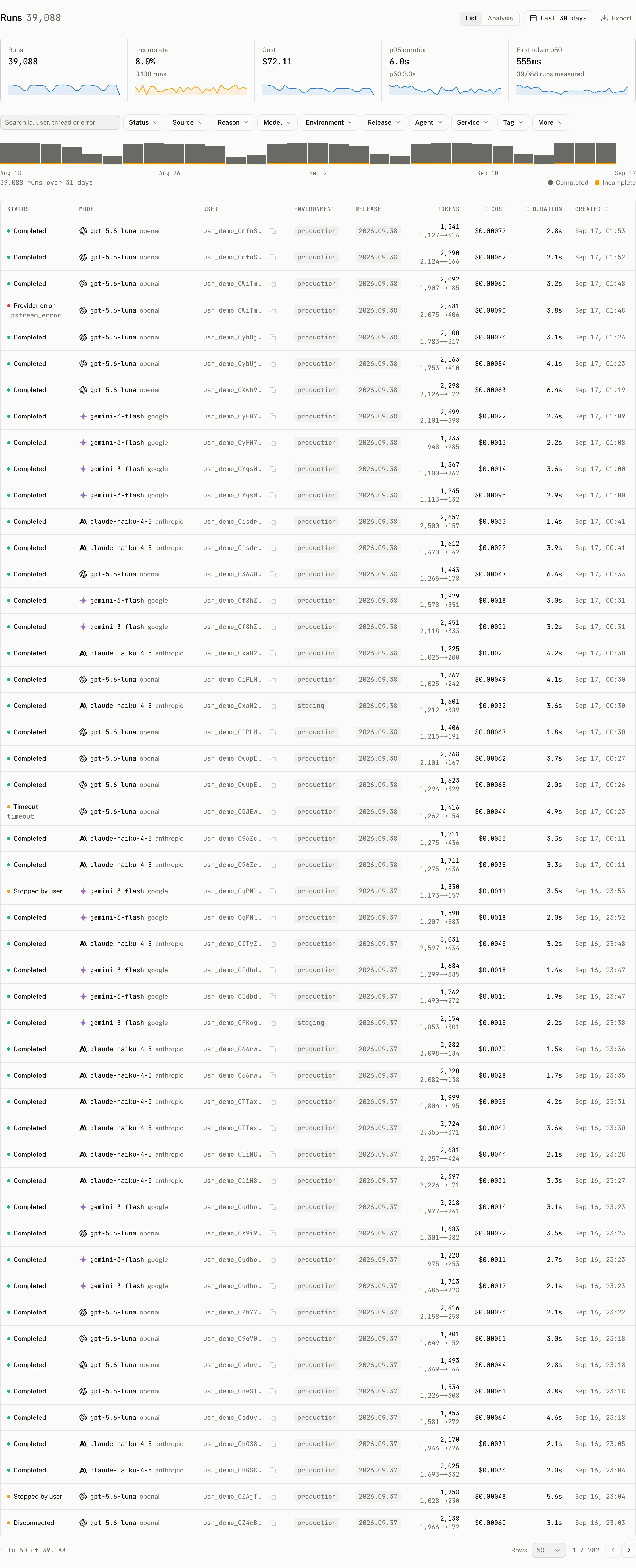
The Runs page has Status, Source, Reason, Model, Environment, Release, Agent, Service, Tag, Cost, and Duration facets. Its table shows status, model, user, environment, release, tokens, cost, duration, and creation time. The tiles show Runs, Incomplete, Cost, p95 duration, and First token p50. Search matches a run id, thread id, user, error, or error code.
The analysis view applies the same filters to latency percentiles, duration distributions and heatmaps, a run sample, tool statistics, release statistics, and model statistics. The run detail view shows outcome, source, thread, user, message, assistant, deployment fields, timing, usage, attributes, scores, and a span waterfall with the selected span's arguments or prompt.
Models are grouped by catalog model and provider, while retaining the reported model ids as variants. A model row includes runs, sampled runs, incomplete runs, all four token counters, cost, priced and unpriced run counts, and latency percentiles. Its Price section shows the model it was priced as and input, cached input, and output prices. A run with no model_id cannot name a model in this view or be catalog priced.
Redact, drop, or turn telemetry off
beforeReport receives the fully assembled report. Return a replacement report to redact data or add attributes. Return null to skip it.
const cloud = new AssistantCloud({
  baseUrl: process.env.NEXT_PUBLIC_ASSISTANT_BASE_URL!,
  authToken: getToken,
  telemetry: {
    beforeReport: (report) => {
      if (report.thread_id === internalTestThread) return null;
      return { ...report, metadata: { ...report.metadata, plan: "pro" } };
    },
  },
});| Configuration | Effect |
|---|---|
telemetry: false | Stops run reports, engagement events and the copy of external store messages. Threads and the messages of runtimes that keep them in the cloud still persist. |
telemetry: { events: false } | Keeps run reports and stops engagement events. |
telemetry: { messages: false } | Keeps run reports and events, and stops the copy of messages that LangGraph, LangChain, ADK and other external store runtimes store for the dashboard. |
telemetry: true or omitted | Enables reports and engagement events. |
Troubleshooting
| What you see | Why | What to do |
|---|---|---|
| No new reports or engagement events | telemetry is false. | Enable telemetry. Use events: false only when reports should continue. |
| A report does not appear although the response persisted | beforeReport returned null, threw, or the send failed. Report delivery never surfaces an error to the UI. | Check the callback result and the request. Only a later observation retries a report released after 429. |
| Runs are listed under no model and have no price | The route did not put model, provider, and usage into messageMetadata. | Return modelId, provider, and usage from the route. |
| A client run and server spans remain separate | The report has no valid 32 character hexadecimal trace id, or it does not match the server trace id. | Wrap the route metadata with withAssistantCloudTraceMetadata and export the same trace. |
The report returns message_id must belong to thread_id or user_message_id must belong to thread_id | The message is missing or belongs to a different cloud thread. | Send a stored message id from the report's thread, or omit the field. |
The report returns Thread not found | The caller cannot resolve that thread in its scope. | Create or select the correct cloud thread before sending the report. |
| An expected tag, attribute, text, or token value is absent | It exceeded a report bound or was normalized away. | Keep tags within 20 distinct 64 character values, attributes within 16,384 bytes, text within 50,000 characters, errors within 2,048 characters, and token counters at or below 100,000,000. |