See what people do around answers, from first replies and second turns to reactions, features, and satisfaction signals.
Engagement measures the actions people take around the assistant's answers. Engagement events turn those actions from the assistant-ui cloud client into conversation, reaction, adoption, and satisfaction readings without recording message text. The separate Feedback block shows ratings and the comments end users typed with them.
Feedback
The six tiles come first. The Feedback block follows. It shows rated threads, thumbs up, thumbs down, positive rate, thumbs over time, and the most recent thumbs down with their comments.
What the page answers
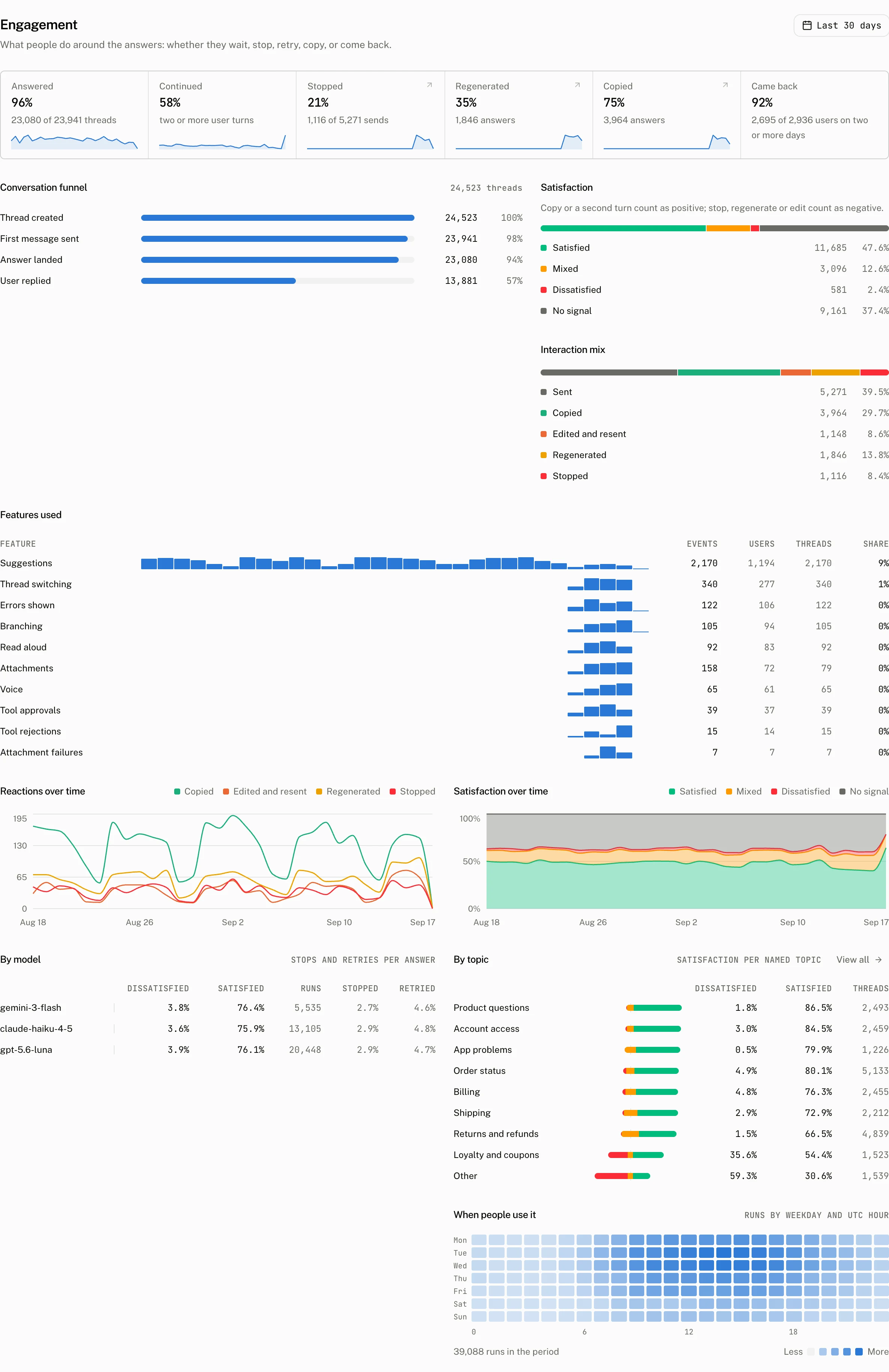
The six tiles cover the selected range.
| Tile | What it counts |
|---|---|
| Answered | Threads that received an answer. |
| Continued | Threads with a second turn. |
| Stopped | Stops as a share of sends. |
| Regenerated | Regenerations as a share of sends. |
| Copied | Copies as a share of sends. |
| Came back | Users who returned on another day. |
Conversation funnel
Conversation funnel shows the path from a thread through an answer and a continued conversation. It reads “No threads in this period” when the range has none.
Satisfaction
Satisfaction reads a thread's ratings first and its behaviour second. A thumbs up on any message makes the positive side true, and a thumbs down on any message makes the negative side true. A rating outranks behaviour: a copy or a second turn is positive only on a thread with no thumbs down, and a stop, regeneration or edit is negative only on a thread with no thumbs up. A thread with both ratings is Mixed. Satisfied has only a positive side, Dissatisfied only a negative side, Mixed both, and No signal neither.
Stops, regenerations and edits come from the assistant-ui cloud client. Copies and second turns provide the positive behaviour signals.
Interaction mix
Interaction mix charts these five event kinds over the range.
| Interaction | Event kind |
|---|---|
| Sent | message_sent |
| Edited and resent | message_edited |
| Regenerated | message_regenerated |
| Copied | message_copied |
| Stopped | run_stopped |
When none are recorded, the page says: “No interactions recorded yet. Update the assistant-ui cloud client; it reports stops, edits, regenerates and copies without any message content.”
Features and reactions
Features used counts the following interactions. These events are emitted when a person takes the corresponding action through assistant-ui components or primitives.
| Feature | What it counts |
|---|---|
| Attachments | attachment_added events when an attachment is added to the composer. |
| Suggestions | suggestion_clicked events, with suggestions_shown reporting impressions. |
| Branching | branch_switched events when someone changes an edit or regeneration branch. |
| Tool approvals | tool_approved events when a tool approval is accepted. |
| Tool rejections | tool_rejected events when a tool approval is rejected. |
| Read aloud | speech_started events when someone plays a message aloud. |
| Voice | voice_started events when someone starts voice input. |
| Thread switching | thread_switched events when someone opens another cloud thread. |
| Errors shown | error_shown events when an error is shown for a run. |
| Attachment failures | attachment_failed events when an attachment upload fails. |
Reactions over time plots the actions people take around answers across the selected range. Satisfaction over time plots the satisfied, mixed, dissatisfied, and no signal reading across the same period. By model compares the satisfaction reading across the models that answered, and By topic compares it across the dashboard's topics.
When people use it
When people use it is a weekday by hour heatmap. It counts runs by weekday and UTC hour.
The interaction figures can lead to the matching Threads view through their Signal facet. The facet includes Stopped, Regenerated, Copied, Edited and resent, Attached a file, Clicked a suggestion, Switched branch, Approved a tool, Rejected a tool, and Saw an error.
Troubleshooting
| What you see | Why | What to do |
|---|---|---|
| Every tile is empty | The selected range has no recorded thread or engagement event data. | Check the range, then send activity through an assistant-ui cloud client with events enabled. |
| A feature row stays at zero | The corresponding user action has not emitted its event for the selected range. | Exercise the action through the assistant-ui components or primitives, then check the range again. |