Read the project's range of runs, people, cost, outcomes, models and recent conversations from one page.
Overview is the dashboard's range summary. It answers how much the assistant ran, how reliably it finished, who used it and what it cost before you open a filtered list.
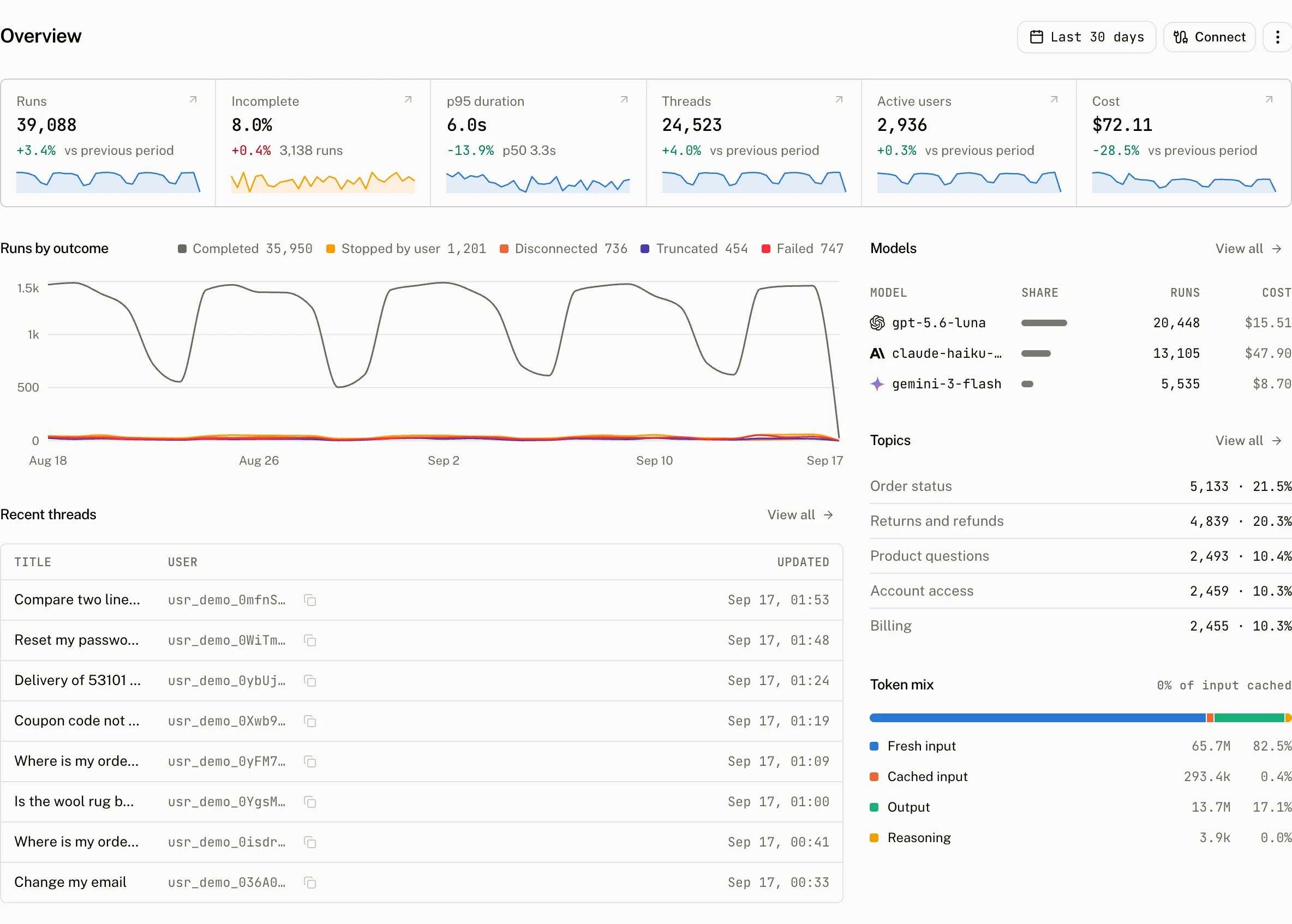
What the page measures
The date picker starts at 30 days. The eight tiles appear in two rows: Runs, Incomplete, p95 duration and Cost, then Threads, Active users, Rated threads and Thumbs down. Every tile compares its current reading with the immediately preceding range of equal length, and its sparkline shows the reading across the selected range. Open a tile to investigate the matching list or billing view with the selected range preserved.
| Tile | Reading for the selected range | Comparison and sparkline | Opens |
|---|---|---|---|
| Runs | Total runs. | The total against the previous range, with runs in each bucket. | Runs |
| Incomplete | The incomplete rate and the number of incomplete runs. | The rate against the previous range, with the share of incomplete runs in each bucket. | Runs, filtered to incomplete or error |
| p95 duration | The duration under which 95 percent of runs finished. The tile also prints p50. | The p95 against the previous range, with daily p95 duration. | Runs |
| Cost | Total run cost. | The total against the previous range, with cost in each bucket. | Billing usage |
| Threads | Threads with activity in the range. | The total against the previous range, with threads in each bucket. | Threads |
| Active users | Distinct active users. | The total against the previous range, with active users in each bucket. | Users |
| Rated threads | Threads with a rating. | The total against the previous range, with rated threads in each bucket. | Threads, with Feedback set to Any rating |
| Thumbs down | Threads with a thumbs down rating. | The total against the previous range, with thumbs down in each bucket. | Threads, with Feedback set to Thumbs down |
The Token mix block separates input, cached input, output and reasoning tokens for the selected range.
Read outcomes and configuration changes
Runs by outcome draws one series per bucket. A completed status goes to Completed. Every other bucket is decided by outcome_type.
| Chart bucket | Stored value |
|---|---|
| Completed | status: "completed" |
| Stopped by user | outcome_type: "aborted" |
| Disconnected | outcome_type: "disconnected" |
| Truncated | outcome_type: "length" or "content_filter" |
| Failed | Any other nonempty outcome_type |
| Incomplete, no reason | No outcome_type |
The chart also puts configuration marks in the bucket that contains the recorded change. Marks come only from audit entries for feature, project, provider and model_price. Their summaries include Thread titles: turned on, model set to gpt-…, Retention to 30 days, pending, Retention change cancelled, Provider {name} added and Model price for {pattern} set.
Find the next conversation
Get started is a checklist over three resources, LLM providers, assistants and API keys. Each step is a link. The single Connect button opens a dialog with the API Endpoint and Project ID. The checklist hides when every step is complete.
Recent threads lists the 8 most recently active threads, ordered by last_message_at, with each creator's display name. The Topics tile shows the topics Intelligence found, and the model list is the range's share of runs by model.
Troubleshooting
| What you see | Why | What to do |
|---|---|---|
| The page has no figures. | The selected range has no stored activity to summarise. | Choose a range that contains runs or conversations, then check the matching list page. |
Cost is 0 while runs are present. | A run can have no recorded cost_usd, including when its model has no catalog price or matching price override. | Inspect the model on the run, then add a matching price override in Model prices or send cost with the report. |
| A configuration mark does not describe the change you expected. | The chart accepts marks only for feature, project, provider and model_price, and renders its own short audit summary. | Compare the change in Audit log and its timestamp with the selected chart bucket. |