Connect the AI SDK runtime to Assistant Cloud for persisted threads, titles, run reports, engagement, feedback and attachments.
useChatRuntime from @assistant-ui/ai-sdk wraps the AI SDK chat transport with a thread list and message history. Give it an Assistant Cloud client and the same chat UI gains persisted conversations, automatic titles, run reports and the cloud adapters behind feedback and attachments. It works with assistant-ui components, primitives or a headless runtime on React, React Native and Ink.
What you get
| Capability | How the runtime supplies it |
|---|---|
| Cloud threads | The cloud thread-list adapter lists active and archived threads, creates a remote id when a thread initializes, and sends rename, archive, restore and delete actions to the project. |
| Persistent message history | The AI SDK external-history layer stores messages in ai-sdk/v6, reloads a thread once when it is opened, and keeps local to cloud message ids so later writes target the stored row. |
| Thread titles | The thread-list adapter can ask the cloud title assistant to name a thread. It sends only text and tool-call parts. |
| Run reports | A terminal assistant message becomes a report with message status, outcome, error, timings, steps, tool calls and the metadata your route supplied. |
| Engagement events | The cloud history adapter subscribes to runtime interactions, then resolves the cloud thread and message ids before sending engagement data. |
| Feedback | The default feedback adapter sends positive or negative feedback only after it can map the displayed message to its stored cloud row. |
| Attachments | The default attachment adapter requests an upload URL from the project, uploads the file, then turns it into an image part or a file part for the message. |
Setup
Environment
NEXT_PUBLIC_ASSISTANT_BASE_URL=https://proj-<id>.assistant-api.comEXPO_PUBLIC_ASSISTANT_BASE_URL=https://proj-<id>.assistant-api.com
EXPO_PUBLIC_API_URL=https://your-app.example.comASSISTANT_BASE_URL=https://proj-<id>.assistant-api.com
API_URL=https://your-app.example.comThe frontend API URL is on Settings › General. On React Native and Ink the chat route is not on the app's origin, so the second variable names the server that hosts it. An API key is only needed on the server, for traces or a token endpoint.
Install
npm install @assistant-ui/react @assistant-ui/ai-sdk ai @ai-sdk/openai@assistant-ui/react re-exports AssistantCloud, so there is nothing else to install. The example signs in with Clerk; add @clerk/nextjs, or swap the token callback for your provider's.
npx expo install @assistant-ui/react-native @assistant-ui/ai-sdk assistant-cloudnpm install @assistant-ui/react-ink @assistant-ui/ai-sdk assistant-cloud ink reactCreate the client and the runtime
"use client";

import { useMemo } from "react";
import { useAuth } from "@clerk/nextjs";
import { AssistantCloud, AssistantRuntimeProvider } from "@assistant-ui/react";
import { useChatRuntime } from "@assistant-ui/ai-sdk";
import { ThreadList } from "@/components/assistant-ui/elements/thread-list.aui";
import { Thread } from "@/components/assistant-ui/elements/thread.aui";

export default function ChatPage() {
  const { getToken } = useAuth();
  const cloud = useMemo(
    () =>
      new AssistantCloud({
        baseUrl: process.env.NEXT_PUBLIC_ASSISTANT_BASE_URL!,
        authToken: () => getToken({ template: "assistant-ui" }),
      }),
    [getToken],
  );

  const runtime = useChatRuntime({ cloud });

  return (
    <AssistantRuntimeProvider runtime={runtime}>
      <div className="grid h-dvh grid-cols-[240px_1fr]">
        <ThreadList />
        <Thread />
      </div>
    </AssistantRuntimeProvider>
  );
}
For a prototype on Next.js, omit cloud: with NEXT_PUBLIC_ASSISTANT_BASE_URL set, the runtime creates an anonymous client itself. Vite, React Router and TanStack Start do not expose that variable to the browser; there, create new AssistantCloud({ baseUrl: import.meta.env.VITE_ASSISTANT_BASE_URL, anonymous: true }) once, outside the component, and pass it.
import { useMemo } from "react";
import { Text, View } from "react-native";
import {
  AssistantRuntimeProvider,
  ThreadListItemPrimitive,
  ThreadListPrimitive,
} from "@assistant-ui/react-native";
import { AssistantCloud } from "assistant-cloud";
import { AssistantChatTransport, useChatRuntime } from "@assistant-ui/ai-sdk";
import { Thread } from "@/components/assistant-ui/elements/thread.aui";

async function getAssistantToken() {
  // Return a user token from your auth provider.
  return "...";
}

function ThreadList() {
  return (
    <ThreadListPrimitive.Root>
      <ThreadListPrimitive.New>
        <Text>New chat</Text>
      </ThreadListPrimitive.New>
      <ThreadListPrimitive.Items
        renderItem={({ threadId }) => (
          <ThreadListItemPrimitive.Root key={threadId}>
            <ThreadListItemPrimitive.Trigger>
              <ThreadListItemPrimitive.Title fallback="New conversation" />
            </ThreadListItemPrimitive.Trigger>
          </ThreadListItemPrimitive.Root>
        )}
      />
    </ThreadListPrimitive.Root>
  );
}

export default function ChatScreen() {
  const cloud = useMemo(
    () =>
      new AssistantCloud({
        baseUrl: process.env.EXPO_PUBLIC_ASSISTANT_BASE_URL!,
        authToken: getAssistantToken,
      }),
    [],
  );
  const runtime = useChatRuntime({
    cloud,
    transport: new AssistantChatTransport({
      api: `${process.env.EXPO_PUBLIC_API_URL}/api/chat`,
    }),
  });

  return (
    <AssistantRuntimeProvider runtime={runtime}>
      <View style={{ flex: 1 }}>
        <ThreadList />
        <Thread />
      </View>
    </AssistantRuntimeProvider>
  );
}import { useMemo } from "react";
import { Box, Text } from "ink";
import {
AssistantRuntimeProvider,
ThreadListItemPrimitive,
ThreadListPrimitive,
} from "@assistant-ui/react-ink";
import { AssistantCloud } from "assistant-cloud";
import { AssistantChatTransport, useChatRuntime } from "@assistant-ui/ai-sdk";
import { Thread } from "./components/thread.js";
async function getAssistantToken() {
// Return a user token from your CLI auth flow.
return "...";
}
function ThreadList() {
return (
<ThreadListPrimitive.Root>
<ThreadListPrimitive.New>
<Text color="green">[New chat]</Text>
</ThreadListPrimitive.New>
<ThreadListPrimitive.Items
renderItem={({ threadId }) => (
<ThreadListItemPrimitive.Root key={threadId}>
<ThreadListItemPrimitive.Trigger>
<ThreadListItemPrimitive.Title fallback="New conversation" />
</ThreadListItemPrimitive.Trigger>
</ThreadListItemPrimitive.Root>
)}
/>
</ThreadListPrimitive.Root>
);
}
export function Chat() {
const cloud = useMemo(
() =>
new AssistantCloud({
baseUrl: process.env.ASSISTANT_BASE_URL!,
authToken: getAssistantToken,
}),
[],
);
const runtime = useChatRuntime({
cloud,
transport: new AssistantChatTransport({
api: `${process.env.API_URL}/api/chat`,
}),
});
return (
<AssistantRuntimeProvider runtime={runtime}>
<Box flexDirection="column">
<ThreadList />
<Thread />
</Box>
</AssistantRuntimeProvider>
);
}Keep the client in a useMemo: it holds the cached token, and the runtime keys its thread list on the instance.
Fill in model and usage on the route
The browser sees the stream, not the model behind it. A messageMetadata callback on the AI SDK route puts model, provider, usage and finish reason into the message metadata the runtime stores and reports:
import { convertToModelMessages, streamText } from "ai";
import { openai } from "@ai-sdk/openai";

export async function POST(req: Request) {
  const { messages } = await req.json();
  const model = openai("gpt-6-luna");
  const result = streamText({
    model,
    messages: await convertToModelMessages(messages),
  });

  return result.toUIMessageStreamResponse({
    messageMetadata: ({ part }) => {
      if (part.type === "finish") {
        return { usage: part.totalUsage, finishReason: part.finishReason };
      }
      if (part.type === "finish-step") {
        return { modelId: part.response.modelId, provider: model.provider };
      }
      return undefined;
    },
  });
}
Run reports explains how the cloud reads these fields, and Traces adds the trace id that joins the report to your server's spans.
Cloud options
useChatRuntime forwards ordinary AI SDK chat options to each thread. These are the options whose value changes the cloud integration.
useChatRuntime option | Default | Behaviour |
|---|---|---|
cloud | undefined, then on Next.js an anonymous client from NEXT_PUBLIC_ASSISTANT_BASE_URL when that environment variable exists | Supplies the remote list and registers the AI SDK identity with the client. Without a client or that environment variable, the thread list remains in memory. |
onThreadIdChange | undefined | Receives the settled thread id whenever the remote thread list changes selection. Use it to keep a route or another store in sync. |
transport | The per-thread AI SDK transport configuration | Is forwarded to the chat for each thread. The cloud remote id is the chat id for the cloud-backed conversation. |
adapters.history | Cloud history adapter when a cloud client is available | Persists ai-sdk/v6 messages and produces cloud run reports. A replacement used by this runtime must implement withFormat. |
adapters.attachments | Cloud file attachment adapter when a cloud client is available | Gets upload URLs and converts uploaded files to message parts. |
adapters.feedback | Cloud message feedback adapter when a cloud client is available | Sends feedback after the adapter resolves the cloud message id. |
adapters.speech, adapters.dictation | No cloud default | Remain ordinary speech and dictation adapters. |
toCreateMessage | undefined | Converts an assistant-ui message to the AI SDK message the transport sends. Use it when outgoing metadata or content needs a transform. |
onResumeError | undefined | Receives an error when a resumable stream cannot reconnect. The runtime still clears the stale stream id. |
AISDKThreads is the resource-tree entry for AuiConfig and createAssistantClient. Its cloud choices differ from the hook's environment fallback.
AISDKThreads option | Default | Behaviour |
|---|---|---|
cloud | undefined, which keeps an in-memory list | When set, creates a remote cloud list. Every visited cloud thread stays mounted, so a run continues after a thread switch and is stopped if its thread is deleted. |
threadId | undefined | Controls the selected cloud thread. It is ignored without cloud. |
onThreadIdChange | undefined | Receives the settled remote id after a cloud list selection changes. |
transport | One AssistantChatTransport per thread | A transport factory runs once per thread. A plain AssistantChatTransport instance is cloned per thread, while another transport instance is shared. |
Control reports and events
Telemetry is configured on the AssistantCloud client, not on useChatRuntime.
telemetry field | Default | Behaviour |
|---|---|---|
enabled | true | false prevents both run reports and engagement events. |
events | true when telemetry is enabled | false keeps run reports but drops engagement events. |
messages | true when telemetry is enabled | Has no effect on this runtime, which persists its own messages. |
release | Unset | Adds the value to every run report. |
environment | Unset | Adds the value to every run report. |
tags | Unset | Trims and de-duplicates values, limits each to 64 characters and keeps at most 20. |
beforeReport | Unset | Runs after the client adds release, environment and tags. Returning null skips that report without consuming its deduplication key; a thrown error is ignored. |
Persist and report a run
The history adapter stores the AI SDK representation as ai-sdk/v6. It omits the local message id while writing, restores the server id while reading and preserves the stored parent link. It stores tool artifacts, recorded interactions and approval answers in __aui_toolArtifacts, __aui_toolInteractions and __aui_toolApprovalResponses. Loading happens once for a thread, then waits for a remote id when one is not available yet.
After a run settles, the external-history layer waits one macrotask before it writes. That debounce absorbs short-lived agentic step changes. It appends each new inner message with its parent chain, and updates an already stored message only when its encoded content changed, the run has a measured duration and the history adapter supports update. Tool artifacts, recorded interactions and approval answers update the stored message as soon as they are available. A message paused for approval is stored early when the history adapter supports update. Writes are serialized, so a later write follows the pending one.
The same settling pass reports each assistant message once it is terminal. The runtime measures the duration from the run start to its last boundary, captures time to first token from streaming timing, and records step boundaries as new tool calls appear. It sends step timestamps when more than one boundary was observed.
Fields sent to the cloud
The report contains the required thread_id and status, then includes the fields the runtime observed.
| Report group | Fields |
|---|---|
| Message result | message_id, outcome_type, error_code, error |
| Model and usage | model_id, provider, provider_type, input_tokens, output_tokens, reasoning_tokens, cached_input_tokens |
| Steps and tools | steps, total_steps, tool_calls |
| Timing and output | duration_ms, first_token_ms, output_text |
| Correlation and context | trace_id, metadata, environment, release, tags |
Metadata read from the stream
The route sample supplies model, provider, total usage and the finish reason. The report reads the following stored metadata when it is present.
| Metadata key | Report use |
|---|---|
modelId | model_id, used to identify the model in run and model views. |
provider | provider, used with the model id for model grouping. |
usage | Total input, output, reasoning and cached-input token counts. |
steps[].usage | Per-step usage. It is also the usage fallback when total usage is absent. |
finishReason | Derives the report status and outcome from the stored assistant message. |
traceId | Connects the report to a trace when it is a valid trace id. |
samplingCalls[toolCallId] | Attaches recorded model sampling to its tool call. |
What this runtime cannot observe
useChatRuntime reads the stored message and the assistant-ui thread message. It does not observe the AI SDK finish event itself.
| Missing signal | Why | What the dashboard shows |
|---|---|---|
| Provider finish reason for each step | The only step finish reason this path creates is tool-calls, for a step that made a tool call. | Step timing and tool calls are present, but a provider's per-step finish reason is not. |
| A dropped connection rather than a stop | The outcome calculation receives a finish reason and error state, not a live disconnect signal. | This runtime cannot report disconnected; a stop and a connection loss do not become distinct outcomes here. |
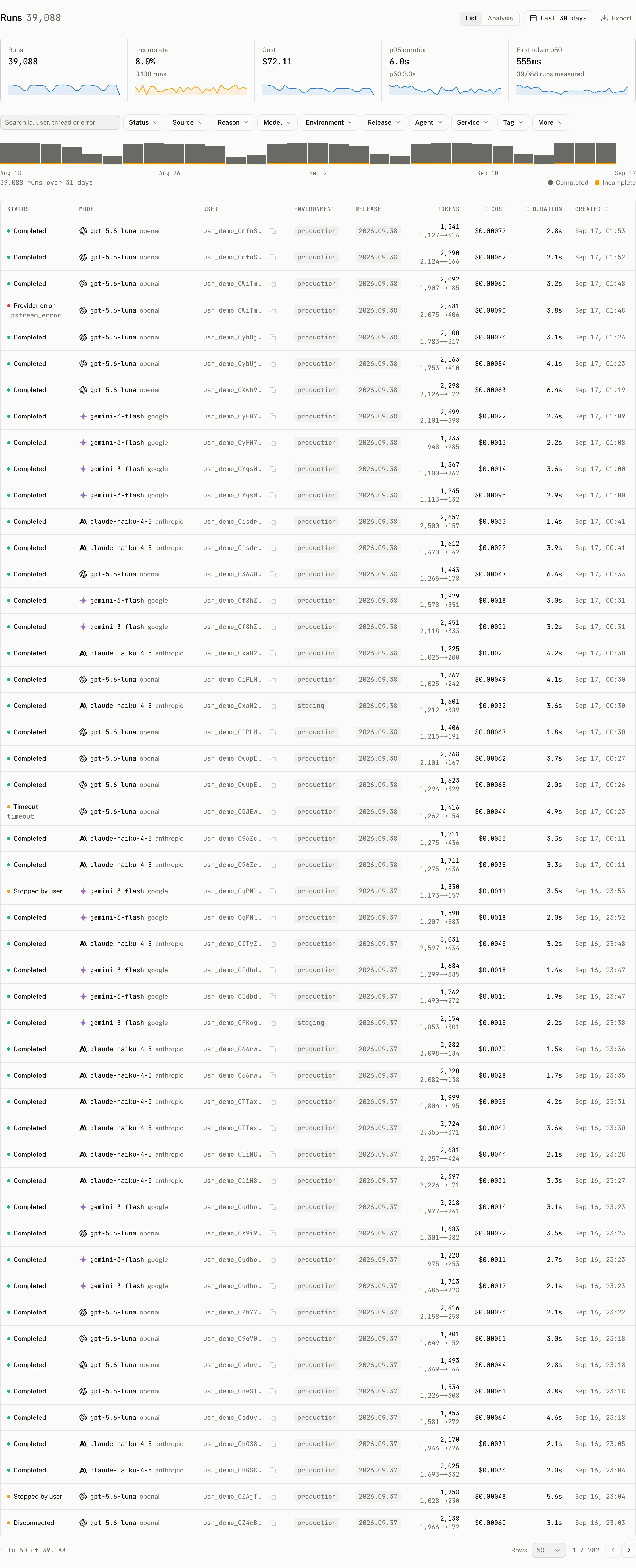
| Model, provider, usage or trace id without route metadata | Those values are not visible in the browser stream unless the route records them in message metadata. | The Models page reads No run in this period reported a model. It names a model only when the client sent its id. |
The cloud does not support deleting individual thread messages. A delete request from this history adapter fails instead of removing the stored row.
Feedback and attachments
| Default adapter | What it does | When it does nothing |
|---|---|---|
| Feedback | Sends the selected feedback type to the stored cloud message. | The thread has no remote id, or the local message has not resolved to a cloud message id. Submission failures do not throw into the UI. |
| Attachments | Starts with a pending upload, asks the project for a presigned upload URL, uploads with the file's content type, then sends an image part for an image or a file part otherwise. | A cancelled upload stops its request. A failed upload becomes an incomplete attachment instead of a message part. |
Pass an adapter in adapters.feedback or adapters.attachments to replace one of these defaults. See attachments for the cloud attachment flow.
Other AI SDK stream backends
Any backend that answers with an AI SDK UI message stream can use this runtime and its cloud option. A Mastra agent uses the same useChatRuntime call. Cloudflare Agents is different: its guide wraps useAgentChat with useAISDKRuntime, which has no cloud option, and its conversation belongs to the Durable Object.
Examples and templates
with-cloudis the smallest anonymous-cloud example. It constructs a client and passes it touseChatRuntime.- The
cloudtemplate adds an anonymous client, a thread-list sidebar and anAssistantChatTransportroute. - The
cloud-clerktemplate uses an authentication-token callback when it constructs the client.
Troubleshooting
| What you see | Why | What to do |
|---|---|---|
| The Models page says No run in this period reported a model | The route did not put modelId in message metadata. Provider, usage and trace data are missing for the same reason when their keys are absent. | Return the metadata in the AI SDK route, as in the setup sample. |
| History is empty after switching runtimes | Reading is one way. The messages API converts stored aui/v0 rows to ai-sdk/v6, but the local runtime does not convert stored ai-sdk/v6 rows back to aui/v0. | Use the AI SDK runtime to read local-runtime history. If you switched to the local runtime, start new threads or read the stored rows through messages. |
useAISDKRuntime says the history adapter is missing withFormat | A custom history adapter does not provide the format boundary required by AI SDK persistence. | Use the cloud history adapter, or implement ThreadHistoryAdapter.withFormat with a message-format adapter. |
| The thread list stays in memory | cloud was omitted, and NEXT_PUBLIC_ASSISTANT_BASE_URL is not set or the bundler does not expose it to the browser, as on Vite, React Router and TanStack Start. | On Next.js set the environment variable; elsewhere construct and pass an AssistantCloud client. |
| A report cannot say whether a run stopped or disconnected | The stored-message path does not receive a live disconnect signal. | Treat the reported outcome as the information this runtime can observe. |